
 Simon
SimonModern enterprise cloud architectures demand more than just functional monitoring — they demand secure monitoring. By default, the Azure Monitor Agent ships logs and metrics over the public internet — in regulated industries like finance, healthcare, or government, and anywhere network perimeter control is non-negotiable, that is a hard blocker.
In this post I’ll walk through a production-ready Terraform solution that solves exactly this: a hub-spoke topology on Azure that routes all VM telemetry to Log Analytics Workspaces without a single byte touching the public internet — structured as two reusable modules with a clean split between platform team and workload team ownership.
Contents
The Problem with Default Azure Monitoring
By default, the Azure Monitor Agent (AMA) sends logs and metrics over the public internet to Azure Monitor endpoints. For many workloads this is perfectly fine — but in regulated industries (finance, healthcare, government) or simply in security-conscious organizations, this is a non-starter.
The typical concerns are:
- Telemetry leaving the private network perimeter
- No network-level enforcement of data paths
- Difficult to audit and prove compliance
The good news: Azure provides all the building blocks to solve this. The challenge is wiring them together correctly.
The Solution: Azure Monitor Private Link Scope
Azure Monitor Private Link Scope (AMPLS) is the central piece of this puzzle. It acts as a private gateway for all Azure Monitor traffic — ingestion, queries, agent communication — routing everything through a single Private Endpoint that lives inside your VNet.
Combined with a hub-spoke network topology, this gives you a clean, scalable, and auditable monitoring architecture that works across multiple teams and workloads.
Architecture Overview
The design follows a strict separation of concerns between a central hub (owned by the platform team) and one or more spokes (owned by individual workload teams).
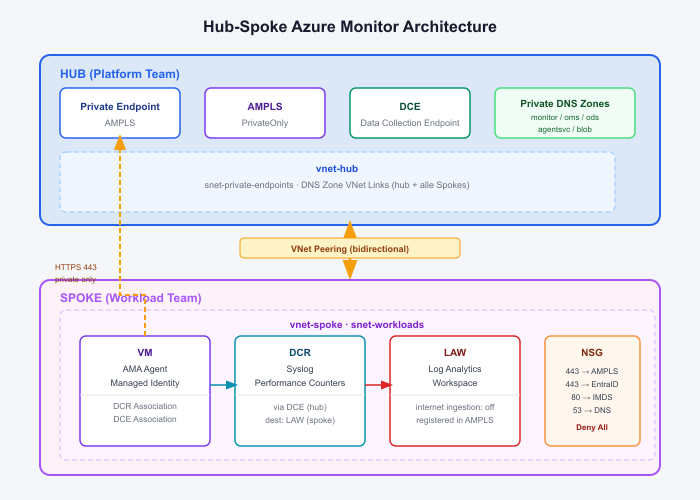
Hub — The Central Landing Zone
The hub is deployed once and shared across all spokes. It contains everything related to the private monitoring infrastructure:
- AMPLS configured with
ingestion_access_mode = PrivateOnly, meaning no public ingestion is possible. - Data Collection Endpoint (DCE) with public network access disabled, serving as the single ingestion point for all AMA agents across all spokes.
- Private Endpoint that maps all Azure Monitor subresources into the hub VNet via a private IP.
- Private DNS Zones for all five Azure Monitor endpoints, linked to the hub VNet and every spoke VNet — ensuring DNS resolution always returns private IPs.
The hub is a one-time investment. Every new spoke simply registers its Log Analytics Workspace into the existing AMPLS and links its VNet to the existing DNS zones.
Spoke — The Workload Layer
Each spoke contains the workload-specific resources:
- Log Analytics Workspace (LAW) with
internet_ingestion_enabled = false, registered into the hub AMPLS via a scoped service connection. - VMs with the Azure Monitor Linux Agent and a SystemAssigned Managed Identity — no secrets, no credentials, just identity-based authentication.
- Data Collection Rules (DCR) defining exactly what data to collect: Syslog facilities, Performance Counters, and more.
- NSG on the workload subnet enforcing least-privilege outbound rules.
The Data Flow
When the AMA on a spoke VM wants to ship a log entry, here is what happens:
- The agent resolves the DCE hostname via Azure DNS — the Private DNS Zone returns a private IP (the hub Private Endpoint).
- The agent fetches an MSI token from the Instance Metadata Service (IMDS) at
169.254.169.254to authenticate the managed identity. - The agent sends the log payload over HTTPS to the private IP — traffic flows through the VNet peering into the hub subnet, never leaving the private network.
- Data lands in the spoke’s Log Analytics Workspace, queryable from the Azure Portal.
Security in Depth
This architecture applies multiple layers of security controls, which is what makes it suitable for enterprise and regulated environments.
1. Network Isolation via AMPLS
With ingestion_access_mode = PrivateOnly on the AMPLS, Azure Monitor refuses all public ingestion for any resource linked to that scope. Even if someone misconfigures a VM or bypasses the NSG, the Azure Monitor backend itself will reject the request.
2. NSG with Deny-All Outbound
The workload subnet NSG enforces a strict allowlist of outbound traffic:
| Destination | Port | Purpose |
|---|---|---|
| Hub PE Subnet (10.0.1.0/24) | 443 | AMA → DCE / AMPLS endpoints |
| AzureActiveDirectory | 443 | MSI token acquisition |
| 169.254.169.254 | 80 | IMDS (Managed Identity) |
| 168.63.129.16 | 53 | Azure DNS |
| Everything else | * | DENY |
This means a compromised VM cannot phone home, exfiltrate data, or reach any public endpoint — the NSG enforces this at the network layer independently of the application.
It is also possible not to be that strict when it comes to the NSG – but you need at least the Rules mentioned.
3. Managed Identity — Zero Credentials
The AMA authenticates exclusively via SystemAssigned Managed Identity. There are no API keys, no client secrets, no certificates to rotate. Azure handles the identity lifecycle automatically, and access can be revoked instantly by disabling the identity.
This is a critical security property: there is nothing to steal, leak, or rotate.
4. Private DNS — No Public Resolution
All five Azure Monitor DNS zones are hosted as Private DNS Zones linked to every VNet in the topology. This means:
<workspace-id>.oms.opinsights.azure.comresolves to10.0.1.xinside the network- Public resolution would return a public IP — but public ingestion is blocked by AMPLS anyway (defense in depth)
- Any VM outside the peered topology cannot resolve the private records and cannot connect
5. Defense in Depth
The key insight is that no single control is relied upon alone:
- AMPLS blocks public ingestion server-side
- NSG blocks unauthorized outbound at the network layer
- Private DNS ensures traffic is routed correctly at the DNS layer
- Managed Identity removes credential risk at the identity layer
An attacker would need to simultaneously bypass all four layers to exfiltrate monitoring data.
Infrastructure as Code — Terraform Module Structure
The entire setup is codified in Terraform and split into reusable modules that mirror the organizational boundary between platform team and workload teams.
modules/
  hub/         → AMPLS, DCE, Private Endpoint, Private DNS Zones
  spoke/       → VNet, Peering, DNS Links, LAW, NSG, AMPLS Registration
main.tf
The hub module is deployed once by the platform team and exposes all the information downstream teams need as Terraform outputs — AMPLS name, DNS zone names, PE subnet prefix, hub VNet ID. These outputs can be consumed however fits your setup, whether that’s terraform_remote_state, a CI/CD pipeline passing values as variables, or simply copying them into a tfvars file.
Onboarding a new workload team comes down to a single module call:
module "spoke" {
  source     = "../../modules/spoke"
  spoke_name = "application1"

  vnet_address_space     = "10.2.0.0/16"
  workload_subnet_prefix = "10.2.1.0/24"

  ampls_name           = var.ampls_name
  hub_pe_subnet_prefix = var.hub_pe_subnet_prefix
  hub_vnet_id          = var.hub_vnet_id
  # ...
}That’s all a workload team needs. The module handles VNet peering, DNS zone links, LAW registration into the AMPLS, and the NSG — everything is wired up automatically. A new spoke requires zero changes to the hub.
The full implementation including all module inputs, outputs, and the example spoke environment is available on GitHub: github.com/simon-vedder/monitor_ampls_hubspoke
Lessons Learned
A few things that tripped me up and are worth calling out explicitly:
Managed Identity is not optional. The AMA will start, appear healthy, and silently fail to ship any data if the VM has no SystemAssigned identity. The error only shows up in /var/opt/microsoft/azuremonitoragent/log/mdsd.err — not in any Azure Portal alert.
The streams field in DCR syslog sources is required. Without streams = ["Microsoft-Syslog"] in the syslog data source block, the AMA has no idea where to route the collected syslog events. This is a silent failure.
IMDS needs port 80, not 443. The Instance Metadata Service runs on HTTP, not HTTPS. If your NSG blocks port 80 to 169.254.169.254, the AMA cannot fetch MSI tokens and will not authenticate — even if everything else is perfectly configured.
DNS VNet links must cover every spoke VNet. Private DNS Zones only resolve correctly for VNets that are explicitly linked. Adding a new spoke means adding five new DNS zone VNet links — the spoke module handles this automatically.
When to Use This Architecture
This setup makes sense when:
- You operate in a regulated industry (FSI, healthcare, government) with data residency or network isolation requirements
- Your security policy requires all traffic to stay within defined network perimeters
- You manage multiple teams/workloads and need a consistent, auditable monitoring baseline
- You want to eliminate credential management from your monitoring infrastructure
For smaller setups or development environments, the complexity may not be justified — default public monitoring works fine there.
Conclusion
Combining AMPLS, Private Endpoints, Private DNS Zones, NSGs, and Managed Identity gives you a monitoring architecture that is both operationally simple (agents configure themselves, data flows automatically) and security-hardened (no public exposure, no credentials, network-enforced data paths).
The hub-spoke model ensures this scales gracefully: the platform team owns the shared infrastructure, workload teams own their data, and the contract between them is a clean set of Terraform module inputs and outputs.
No telemetry leaves your network. No credentials exist to compromise. And every control layer is independently auditable.
That is what enterprise-grade monitoring looks like.
