
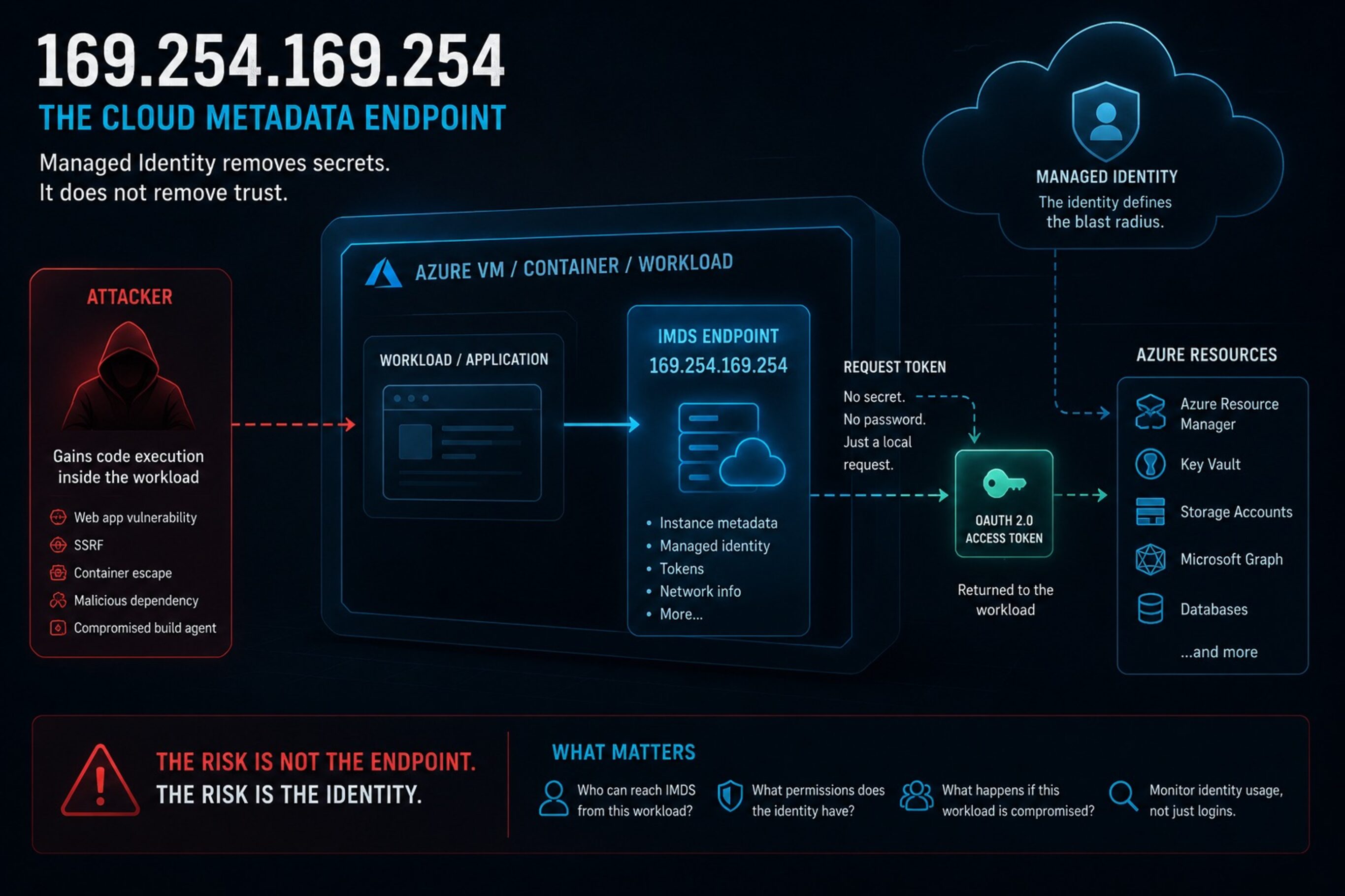
Managed Identity solves credential storage problems. It does not eliminate identity abuse.
Managed Identity is one of those Azure features almost everyone recommends — and honestly, for good reason.
No secrets in configuration files, no client secrets sitting in CI/CD pipelines, no certificates accidentally left on disk. Workloads can authenticate to Azure services without developers having to manage credentials manually, which is a massive improvement over how many environments used to operate.
But there is a part many teams never really think about.
Behind the scenes, the workload still needs a way to obtain tokens. In Azure, that mechanism is the Instance Metadata Service — IMDS — exposed locally through 169.254.169.254.
What 169.254.169.254 Actually Is
169.254.169.254 is a link-local IP address used by major cloud providers for instance metadata.
In Azure, the root endpoint is:
http://169.254.169.254/metadataMicrosoft documents Azure IMDS as a REST API available from inside the VM. It is not routable from the internet. You cannot sit on your laptop and browse to it unless your laptop is the VM.
The service exposes categories such as:
- Instance metadata — VM name, subscription ID, resource group, region, VM size, image details, network information.
- Managed identity — OAuth tokens for system-assigned or user-assigned managed identities attached to the VM.
- Scheduled events — information about upcoming maintenance or platform events.
- Attested metadata — signed metadata that can help prove information about the VM to another party.
- Load balancer metadata — information relevant to Standard Load Balancer scenarios.
The Azure managed identity token endpoint is the one security people usually care about:
http://169.254.169.254/metadata/identity/oauth2/tokenA process on the VM can request a token like this:
curl "http://169.254.169.254/metadata/identity/oauth2/token?api-version=2018-02-01&resource=https%3A%2F%2Fmanagement.azure.com%2F" \
-H "Metadata: true"If the VM has a managed identity, Azure returns an access token for the requested resource.
No password. No client secret. No certificate sitting on disk.
That is the point.
Why IMDS Exists
To be fair to Microsoft, IMDS solves a real problem.
Before managed identities and metadata endpoints, applications often needed credentials somewhere:
- In app settings.
- In environment variables.
- In configuration files.
- In deployment scripts.
- In Key Vault bootstrap secrets.
- In someone’s “temporary” JSON file that somehow survived three years.
Managed identity is much better than that. A VM can authenticate to Azure services without storing long-lived credentials. The workload asks the local metadata endpoint for a token, then uses that token to call Azure Resource Manager, Key Vault, Storage, Microsoft Graph, or another supported service.
That is good engineering.
The problem is not the existence of IMDS. The problem is over-trusting everything that can reach it.
Azure IMDS is unauthenticated from the VM’s point of view. Microsoft explicitly says the service is open to all processes on the VM, and information exposed through it should be treated as shared information for applications running there.
If a process can make HTTP requests from the VM, that process may be able to query IMDS.
The Risk Is Not Metadata. It Is Identity.
Some metadata is useful but not catastrophic.
If an attacker learns the VM size, region, subscription ID, resource group, or network interface details, that is not ideal, but it is usually reconnaissance. Helpful for the attacker, not automatically game over.
Managed identity tokens are different.
Imagine this:
- I compromise a web application running on an Azure VM.
- I get command execution as the application user.
- I call
169.254.169.254from inside the VM. - The VM has a user-assigned managed identity attached.
- That identity has
Contributoron a subscription. - I request a token for
https://management.azure.com/. - I use the token against Azure Resource Manager.
I am no longer “just” on a VM.
I am operating as the managed identity.
The blast radius is not defined by the VM.
It is defined by the permissions assigned to the managed identity.
The endpoint is not the privilege. The identity is.
Common Exposure Paths
Server-Side Request Forgery (SSRF)
The classic IMDS attack path is SSRF.
https://example.internal/fetch?url=http://169.254.169.254/metadata/instance?api-version=2021-02-01If the application blindly fetches the URL, the request originates from the VM. From the metadata service’s point of view, this is a local request.
Azure has some protection here. IMDS requests must include the Metadata: true header and must not contain an X-Forwarded-For header. That makes very basic SSRF harder.
But do not overread that control.
If the vulnerable application lets an attacker control headers, or if the attacker reaches a more flexible request primitive, that header requirement may not save you. If the attacker already has code execution, it definitely does not save you.
Managed Identity With Too Much Permission
This is the big one.
Managed identities are often treated as “safer secrets”, which is true in one narrow sense: there is no long-lived secret to steal.
But the identity still has permissions.
The mistake looks like this:
- “It is only a build VM.”
- “It only runs a small internal app.”
- “We gave it Contributor because deployment was failing.”
- “We reused the same user-assigned identity on multiple VMs.”
- “We forgot that identity still has access to production.”
Then someone compromises the weakest VM and inherits the strongest identity attached to it.
Best Practices
Treat IMDS As A Privileged Local Endpoint
Do not think of 169.254.169.254 as “just metadata”.
On an identity-enabled VM, it is a token broker.
That means access to it should be deliberate. If only one service needs managed identity, design around that. Do not let every local process casually reach it because that was the default.
Keep Managed Identity Permissions Boring
The best managed identity is narrowly scoped and slightly annoying.
- A specific Key Vault secret, not every secret in every vault.
- A specific Storage container, not broad account-level control.
- A resource group scope, not subscription scope.
- A custom role, if built-in roles are too wide.
- No role assignment permissions unless absolutely necessary.
Avoid Contributor as the lazy fix.
Separate Identities By Workload
Do not reuse the same user-assigned managed identity everywhere because it makes deployment easier.
Identity reuse creates shared blast radius.
Block SSRF Properly
- Block link-local ranges such as
169.254.0.0/16. - Block loopback and private ranges unless explicitly needed.
- Resolve DNS and validate the resolved IP.
- Re-check after redirects.
- Avoid user-controlled headers for server-side fetches.
- Use allowlists where possible.
Do Not Put Secrets In Metadata
- VM custom data
- Startup scripts
- Tags
- User data
- Cloud-init snippets
- Extension configuration fields
Use Key Vault or another secret manager instead.
The Short Version
169.254.169.254 is not an internet-facing endpoint.
That does not make it low risk.
In Azure, IMDS is the local metadata and managed identity token endpoint. It helps workloads authenticate without stored credentials, which is good. But any process on the VM that can reach it may be able to learn metadata or request managed identity tokens.
The real question is not:
“Can the attacker reach IMDS from the internet?”
The better question is:
What happens if the weakest process on this VM can get a token for the strongest identity attached to it?
If the answer is “nothing much”, you designed it well.
If the answer is “subscription Contributor”, you have work to do.
Leave a Reply