
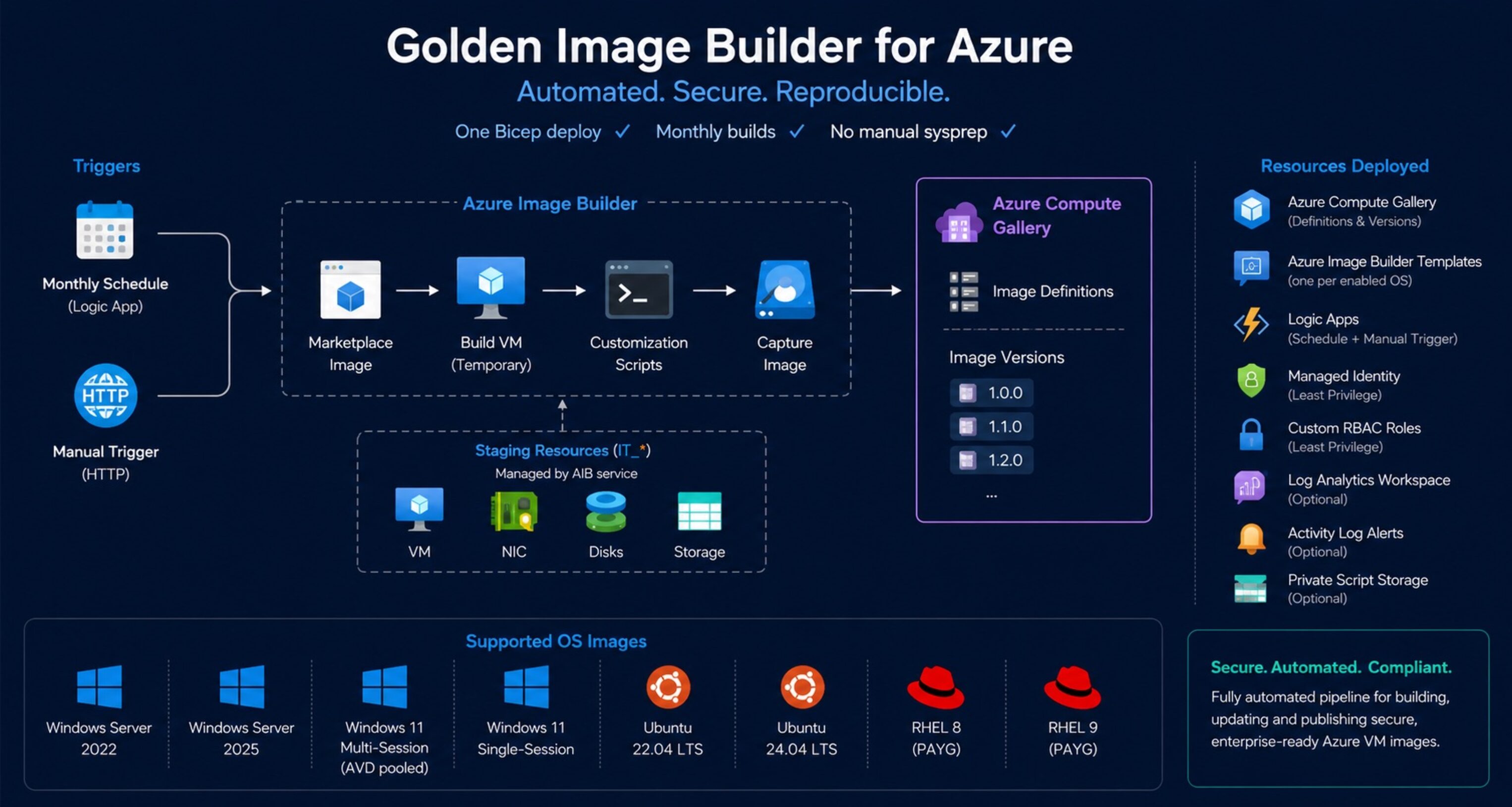
One Bicep deploy. Monthly builds. No manual sysprep.

How this started
Back when I was still heavily working in the Azure Virtual Desktop space, I handled image management the same way many smaller environments still do today: manually.
Every few months I would deploy a VM, install updates, tweak configurations, run sysprep, capture the image, and update the host pool deployment manually. At the time the environment was still relatively small, so the process was annoying — but manageable.
As the environment grew, that approach stopped scaling.
Host deployments became slower, newly provisioned session hosts spent their first boot installing months of Windows updates, and maintaining consistency across environments became increasingly difficult.
Later we moved to Azure Image Builder for the actual image creation process, which already solved a large part of the problem. But even then, the implementation still wasn’t really Infrastructure as Code. There were manual configurations, portal-created resources, inconsistent permissions, and no proper recurring automation around it.
After seeing similar patterns in multiple environments, I decided to build a fully automated and reusable solution around Azure Image Builder — entirely deployed through Bicep.
The result is Golden Image Builder.
What Azure Image Builder already gives you
To be fair to the platform: Azure Image Builder is genuinely capable.
It handles the full image lifecycle inside Azure:
- Pulls a marketplace image
- Creates a temporary build VM
- Runs customization scripts
- Captures the image
- Publishes a version into Azure Compute Gallery
- Cleans up staging resources automatically
No Packer server. No build agents. No custom orchestration VM.
For the core image build process, Azure already provides most of what’s needed.
The operational gaps are usually around automation and governance:
- No native scheduling
- Overly broad RBAC recommendations
- Manual gallery management
- Missing recurring build automation
- Limited visibility into build failures
- No opinionated IaC deployment model
That’s the part this project focuses on.
What Golden Image Builder deploys
One Bicep deployment creates the full image automation platform.
Core resources
- Azure Compute Gallery
- Image Definitions
- Azure Image Builder Templates
- User Assigned Managed Identity
- Custom RBAC Roles
- Logic Apps for scheduling and triggering
- Optional Log Analytics Workspace
- Optional Activity Log Alerts
- Optional private script storage account
Automation flow
The deployment creates:
- A monthly scheduled Logic App
- A manual HTTP trigger Logic App
- One Azure Image Builder template per enabled OS
- Automatic publishing into Azure Compute Gallery
By default, builds run monthly a few days after Patch Tuesday.
What gets baked into the images
The templates don’t just capture a fresh marketplace image. Each build runs
customization scripts before publishing.
CIS-aligned security hardening
Both Windows and Linux images run a hardening script applying CIS Level 1
controls on every build.
Windows:
- SMBv1 disabled (server and client)
- NTLMv2 enforced, LM hashes disabled
- WDigest credential caching disabled
- LSA protection enabled
- Legacy TLS disabled (SSL 2.0/3.0, TLS 1.0/1.1) — TLS 1.2 explicitly enabled
- Windows Firewall enabled for all profiles
- High-risk services disabled: Print Spooler, Remote Registry, Xbox services
- PrintNightmare mitigations applied
Linux:
- Kernel sysctl hardening: ICMP redirect rejection, SYN cookie protection,
dmesg/kptr restrictions - SSH: root login disabled, password auth disabled, idle session timeouts
- Unused filesystems and protocols disabled (cramfs, dccp, sctp, etc.)
- Firewall enabled: ufw on Ubuntu, firewalld on RHEL
- Legacy services disabled: telnet, rsh, tftp, xinetd
This is CIS Level 1 coverage — a solid baseline, not a full compliance kit.
For environments requiring full CIS certification, run the official CIS STIG
tooling post-deployment.
AVD optimizations (Windows)
For Windows 11 images — multi-session and single-session — the build additionally
runs an optimization script based on Microsoft’s VDOT guidance.
- FSLogix installed
- Teams configured for AVD mode (classic and new Teams)
- Non-essential scheduled tasks disabled (CEIP, disk diagnostics, etc.)
- High-performance power plan applied
- WSearch and SysMain disabled to reduce shared-session disk and CPU pressure
- Non-essential inbox apps removed (Xbox, Bing Weather, Maps, etc.)
Supported OS Images
| OS | Marketplace SKU |
|---|---|
| Windows Server 2022 | 2022-datacenter-azure-edition |
| Windows Server 2025 | 2025-datacenter-azure-edition |
| Windows 11 Multi-Session (AVD pooled) | win11-24h2-avd |
| Windows 11 Single-Session | win11-24h2-ent |
| Ubuntu 22.04 LTS | 22_04-lts-gen2 |
| Ubuntu 24.04 LTS | server |
| RHEL 8 (PAYG) | 8-lvm-gen2 |
| RHEL 9 (PAYG) | 9-lvm-gen2 |
The currently included operating systems are simply the images I actively used for this project.
The project itself is built modularly and can easily be extended for additional operating systems within the main.bicep files.
If you want to add support for additional platforms, feel free to adapt the existing templates to your own requirements or contribute via pull requests.
Deploying it
Deploy to Azure
The deployment includes a createUiDefinition.json, which provides a full Azure portal wizard during deployment.
Azure CLI
az group create --name rg-golden-image-prod --location westeurope az deployment group create \ --resource-group rg-golden-image-prod \ --template-file automations/build-golden-image/main.bicep \ --parameters namePrefix=gib-contoso-prodImportant prerequisites
Azure Container Instance quota
Azure Image Builder internally uses Azure Container Instances during builds.
Each concurrent build consumes roughly 3.8 StandardCores.
The default regional quota is often only 10 cores, meaning even a few parallel builds can hit quota limits immediately.
Before deploying, verify the quota under:
Subscriptions → Usage + quotas → Container Instances → StandardCores
Required deployment permissions
The deploying identity requires:
- Contributor
- User Access Administrator
on the target resource group.
The deployment creates custom RBAC role definitions dynamically, which requires permission to manage role assignments and definitions.
Triggering builds manually
TRIGGER_URL=$(az deployment group show \ --resource-group rg-golden-image-prod \ --name main \ --query properties.outputs.manualTriggerUrl.value \ --output tsv) curl -X POST "$TRIGGER_URL"Typical build duration:
- Windows images: ~45–90 minutes
- Linux images: ~20–45 minutes
depending on update size.
Notes and limitations
A few things are intentionally left out for simplicity:
- No automatic validation testing after image creation
- No rollback orchestration
- No third-party marketplace image support
- No automated host pool rollout integration
The goal of the project is to provide a clean, reusable Azure-native image pipeline — not a full VDI lifecycle platform.
Troubleshooting failed builds
If a build fails, the actual logs are usually inside the temporary staging resource group created by Azure Image Builder.
Look for: IT_*
Inside the staging storage account, open: packerlogs/customization.log
That log contains the real customization output from the underlying Packer execution.
Source Code
GitHub repository: github/simon-vedder/bicep/build-golden-image
The repository includes:
- Unified Windows + Linux deployment
- Separate Windows-only deployment
- Separate Linux-only deployment
- Portal UI definition
- Custom RBAC definitions
- Customization scripts
Leave a Reply