
 Simon
SimonThe Problem: Organizations need to deploy agents, monitoring tools or security agents across all Azure VMs consistently. Traditional approaches often fall short:
- Hybrid scenarios exist – not all VMs are Intune-managed and may require different agents (like SCCM)
- Manual deployment doesn’t scale – automation is essential for large VM fleets
- Enforcement must be automatic – agents must stay installed and compliant
The Solution: Azure Policy + VM Applications
Combine Azure Policy’s DeployIfNotExists effect with VM Applications to:
- ✅ Automatically deploy any agent to all VMs (existing and new)
- ✅ Enforce compliance continuously
- ✅ Version and update agents centrally
- ✅ Remediate non-compliant VMs without manual intervention
This bridges the gap between cloud-native management and legacy requirements, giving you automated, scalable agent deployment for any enterprise scenario.
Contents
1. Introduction: Why Deploy Agents via Azure Policy?
In most Azure environments, virtual machines need a consistent set of agents to ensure proper monitoring, security, governance, and configuration. Typical examples include:
- Azure Monitor Agent (AMA)
- Microsoft Defender for Endpoint (MDE)
- Guest Attestation
- Configuration or management agents (e.g., SCCM/ConfigMgr, internal enterprise agents)
While software distribution in general should be handled through tools like Intune or SCCM, agent deployments follow a different pattern: they must be present across all machines, must remain compliant, and should be enforced automatically.
Azure Policy is an excellent fit for this. It allows you to:
- Enforce agent presence automatically
- Remediate missing installations
- Maintain compliance across your VM fleet
- Version and update agents consistently
In this post, I’ll walk you through how to deploy a custom agent to Azure VMs using VM Applications, Azure Policy, and Terraform.
For demonstration purposes, I use 7zip as a simple example package — but the same pattern applies to any enterprise agent.
2. How Azure Policy Works with VM Applications
Azure offers a powerful approach to consistent VM configuration through the combination of:
VM Applications
A VM Application is a package stored in an Azure Shared Image Gallery. It contains:
- Installation files
- Scripts
- Metadata
- Versioning
This makes VM Applications ideal for agent deployment, where version control and reproducibility matter.
DeployIfNotExists Policies
Azure Policy can check whether a resource (in this case, an installed agent) exists.
If it does not, the policy triggers a remediation task that:
- Applies your VM Application to the VM
- Runs your install script
- Brings the VM back into compliance
Why VM Applications Instead of Extensions?
Compared to VM Extensions, VM Applications offer:
- Clean versioning
- Reusable packaging
- Better lifecycle management
- most important: there is just a single custom VM extension allowed per machine
This makes them the ideal foundation for reliable, automated agent deployments.
3. Deploying Custom Agents Using VM Applications
This is the core section: how to deploy your own custom agent.
3.1 Prepare the Agent Package
Your package typically includes:
- The agent installer (MSI/EXE)
- A PowerShell installation script
- Optional configuration files
Your PowerShell script should:
- Support silent installation
- Return proper exit codes
- Produce logs for troubleshooting
- Detect existing installations if needed
Proper exit codes are critical for Azure Policy remediation.
3.2 Create the VM Application in the Shared Image Gallery
You define:
- A VM Application Definition (logical name)
- One or more Versions (e.g., 1.0.0, 1.0.1)
Each version includes:
- Artifact files packaged into a ZIP
- Installer script
- Metadata like publisher, offer, SKU
This gives you clean separation between the agent identity (definition) and its lifecycle (versions).
3.3 Define Your DeployIfNotExists Policy
Your policy should:
- Check whether the agent is installed
- Trigger deployment of the VM Application when missing
- Accept parameters like:
- Version
- Gallery ID
- Install command
The heart of the policy is the remediation action, which applies the VM Application to any non-compliant VM.
3.4 Monitoring Compliance & Remediation
Once the policy is assigned:
- Azure scans all existing VMs
- Non-compliant VMs are marked
- Remediation tasks can be triggered automatically or on-demand
- The VM Application installs your agent
- Compliance status updates accordingly
This brings consistent and traceable agent presence across the environment.
4. Example: Deploying a Custom Agent (7zip Demo) with Terraform
To demonstrate this end to end, I built a Terraform setup that:
- Packages the 7zip installer
- Uploads the artifacts to an Azure Storage Account
- Creates the VM Application Definition and Version
- Generates a DeployIfNotExists policy
- Assigns that policy to a resource group or subscription
Why 7zip?
Because it’s simple and easy to test — but in reality this pattern is perfect for:
- SCCM/ConfigMgr agents
- Internal security agents
- Monitoring collectors
- Custom enterprise utilities
Your Terraform workflow might follow these logical steps:
- Zip Agent Files
- Upload to Storage
- Create SIG (Shared Image Gallery) VM Application
- Create SIG Application Version
- Create Azure Policy
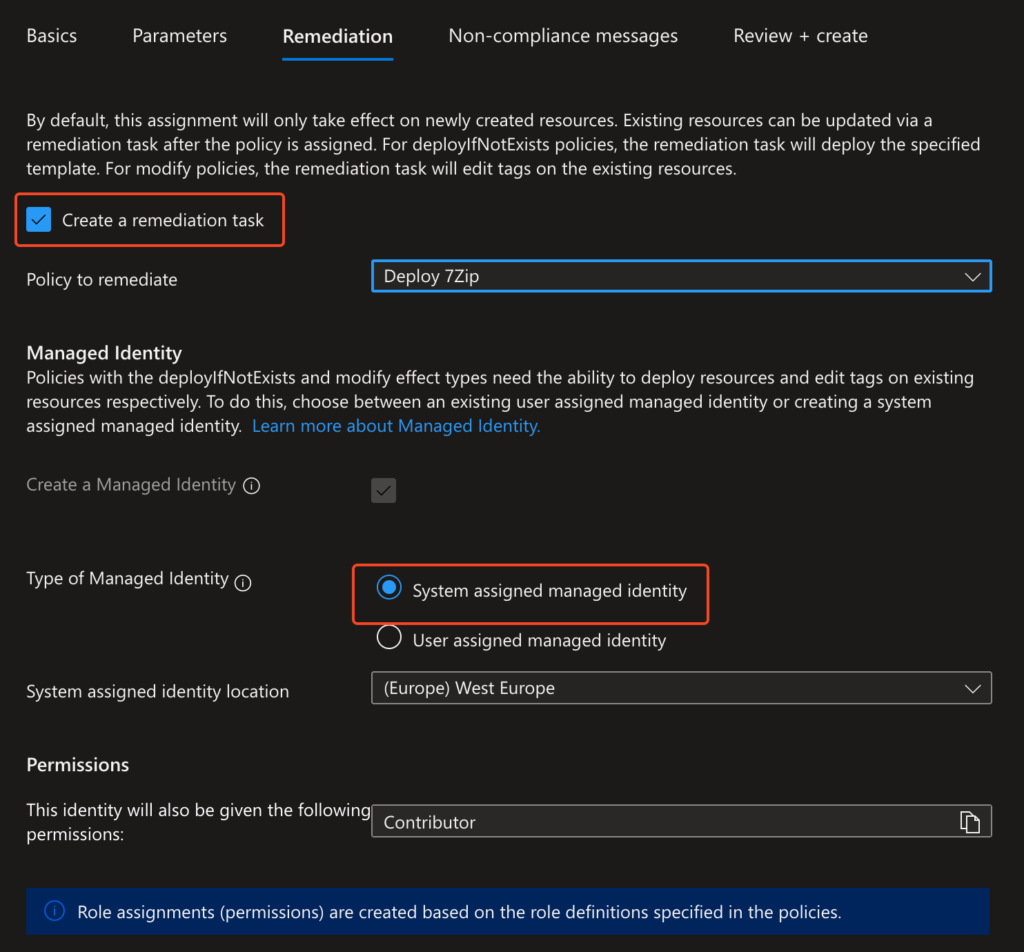
- Assign Azure Policy
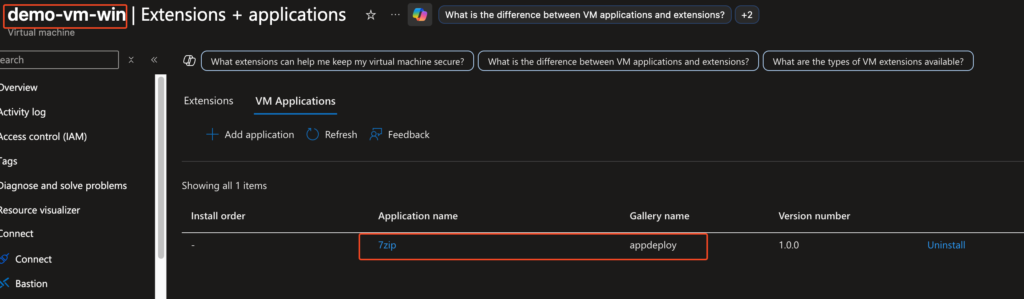
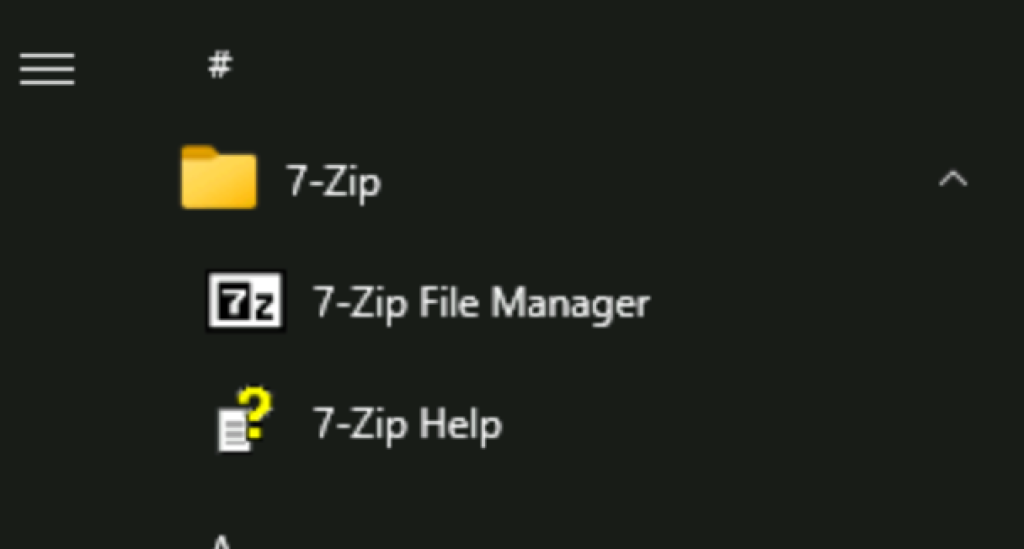
- Trigger Remediation and validate
The result: VMs automatically install the “agent” when they become non-compliant.
Step by Step
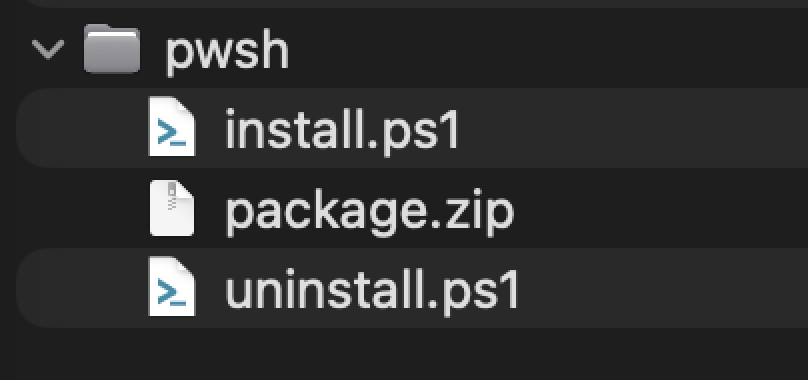
Zip Agent Files
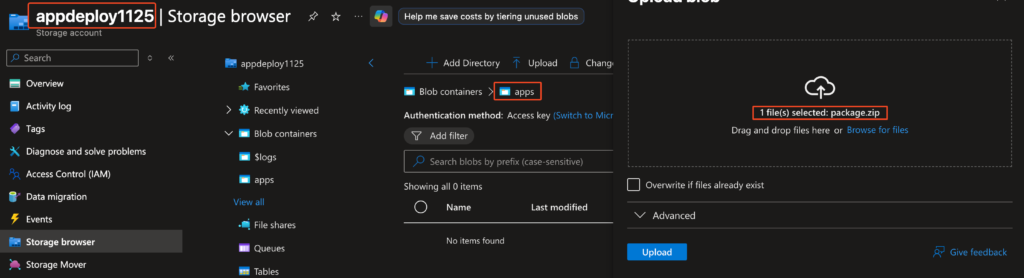
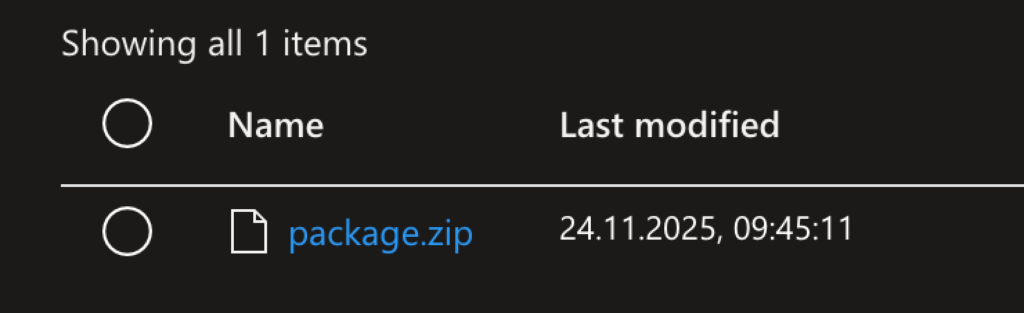
Upload to Storage Account
Requires a storage account with SAS enabled
Create SIG (Shared Image Gallery) VM Application & Application Version
Requires a Shared Image Gallery
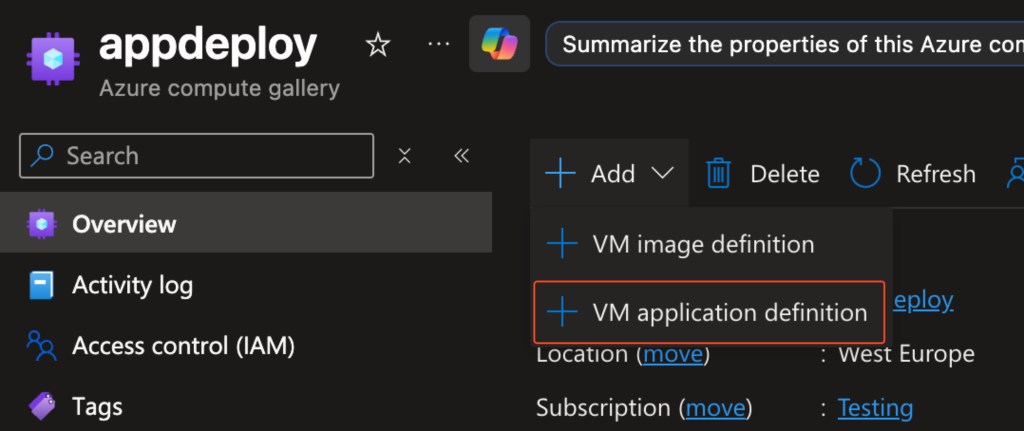
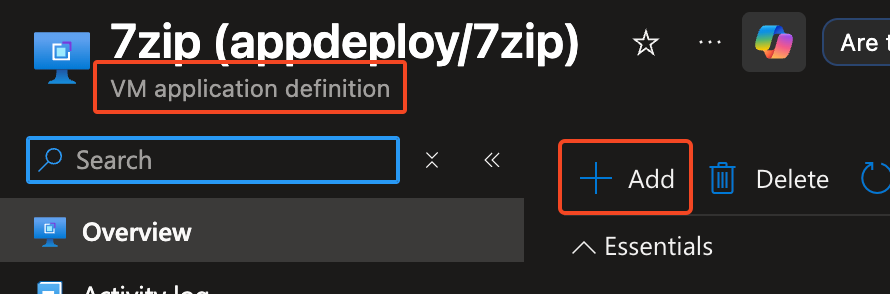
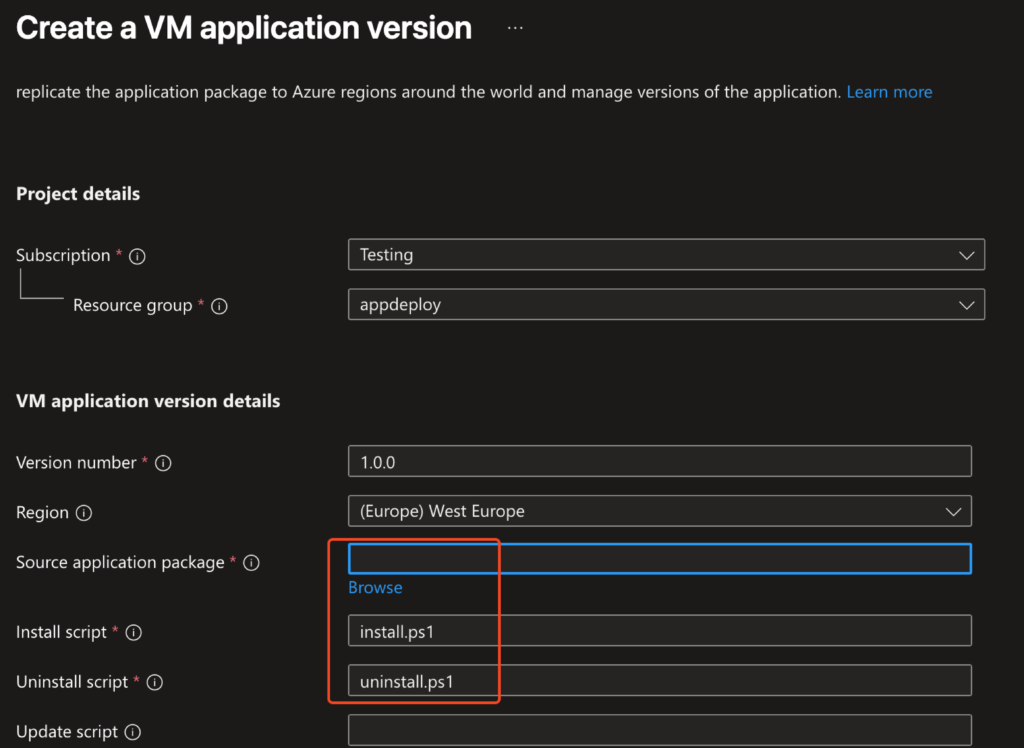

Source application package: Enter the SAS URL of the uploaded package file
Create Azure Policy
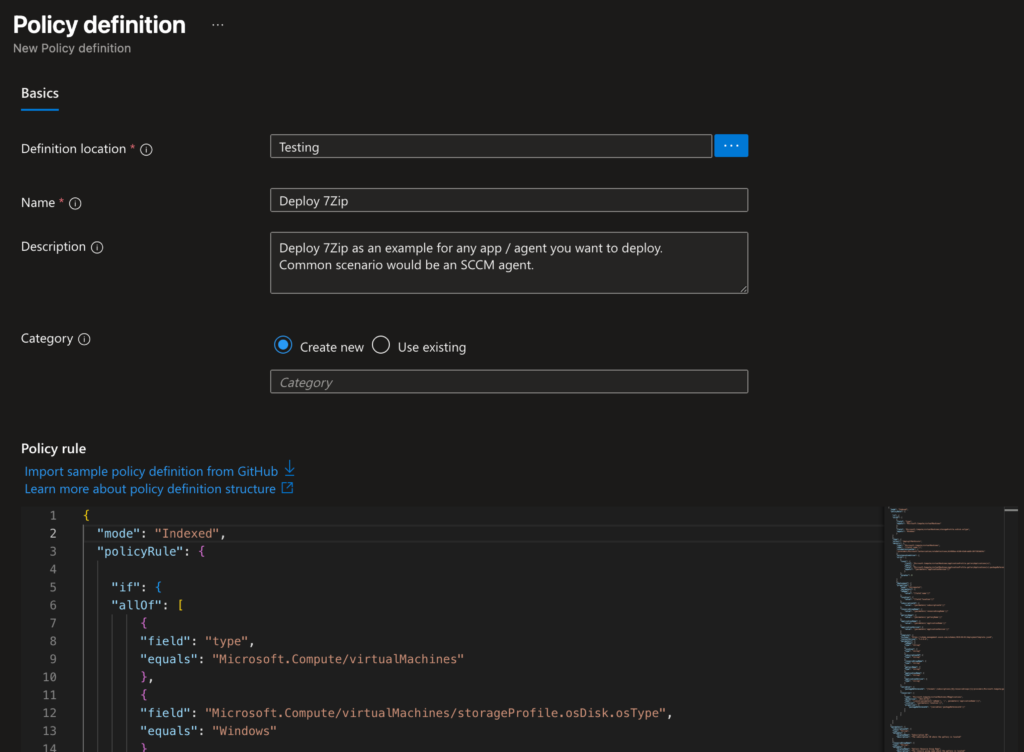
{
  "mode": "Indexed",
  "policyRule": {

    "if": {
    "allOf": [
        {
        "field": "type",
        "equals": "Microsoft.Compute/virtualMachines"
        },
        {
        "field": "Microsoft.Compute/virtualMachines/storageProfile.osDisk.osType",
        "equals": "Windows"
        }
    ]
    },
    "then": {
    "effect": "deployIfNotExists",
    "details": {
        "type": "Microsoft.Compute/virtualMachines",
        "name": "[field('name')]",
        "roleDefinitionIds": [
        "/providers/Microsoft.Authorization/roleDefinitions/b24988ac-6180-42a0-ab88-20f7382dd24c"
        ],
        "existenceCondition": {
        "allOf": [
            {
            "count": {
                "field": "Microsoft.Compute/virtualMachines/applicationProfile.galleryApplications[*]",
                "where": {
                "field": "Microsoft.Compute/virtualMachines/applicationProfile.galleryApplications[*].packageReferenceId",
                "equals": "[parameters('applicationVersion')]"
                }
            },
            "greater": 0
            }
        ]
        },
        "deployment": {
        "properties": {
            "mode": "incremental",
            "parameters": {
            "vmName": {
                "value": "[field('name')]"
            },
            "location": {
                "value": "[field('location')]"
            },
            "subscriptionId": {
                "value": "[parameters('subscriptionId')]"
            },
            "resourceGroupName": {
                "value": "[parameters('resourceGroupName')]"
            },
            "galleryName": {
                "value": "[parameters('galleryName')]"
            },
            "applicationName": {
                "value": "[parameters('applicationName')]"
            },
            "applicationVersion": {
                "value": "[parameters('applicationVersion')]"
            }
            },
            "template": {
            "$schema": "https://schema.management.azure.com/schemas/2019-04-01/deploymentTemplate.json#",
            "contentVersion": "1.0.0.0",
            "parameters": {
                "vmName": {
                "type": "string"
                },
                "location": {
                "type": "string"
                },
                "subscriptionId": {
                "type": "string"
                },
                "resourceGroupName": {
                "type": "string"
                },
                "galleryName": {
                "type": "string"
                },
                "applicationName": {
                "type": "string"
                },
                "applicationVersion": {
                "type": "string"
                }
            },
            "variables": {
                "packageReferenceId": "[format(
      '/subscriptions/{0}/resourceGroups/{1}/providers/Microsoft.Compute/galleries/{2}/applications/{3}/versions/{4}',
                parameters('subscriptionId'),
                parameters('resourceGroupName'),
                parameters('galleryName'),
                parameters('applicationName'),
                parameters('applicationVersion'))]"
            },
            "resources": [
                {
                "type": "Microsoft.Compute/virtualMachines/VMapplications",
                "apiVersion": "2021-07-01",
                "name": "[concat(parameters('vmName'), '/', parameters('applicationName'))]",
                "location": "[parameters('location')]",
                "properties": {
                    "packageReferenceId": "[variables('packageReferenceId')]"
                }
                }
            ]
            }
        }
        }
    }
    }
  },
  "parameters": {
    "subscriptionId": {
    "type": "String",
    "metadata": {
        "displayName": "Subscription ID",
        "description": "The subscription ID where the gallery is located"
    }
    },
    "resourceGroupName": {
    "type": "String",
    "metadata": {
        "displayName": "Gallery Resource Group Name",
        "description": "The resource group name where the gallery is located"
    }
    },
    "galleryName": {
    "type": "String",
    "metadata": {
        "displayName": "Gallery Name",
        "description": "The name of the Compute Gallery"
    }
    },
    "applicationName": {
    "type": "String",
    "metadata": {
        "displayName": "Application Name",
        "description": "The name of the VM Application"
    }
    },
    "applicationVersion": {
    "type": "String",
    "defaultValue": "1.0.0",
    "metadata": {
        "displayName": "Application Version",
        "description": "The version of the VM Application to deploy"
    }
    }

  }
}Assign Policy & Trigger Remediation
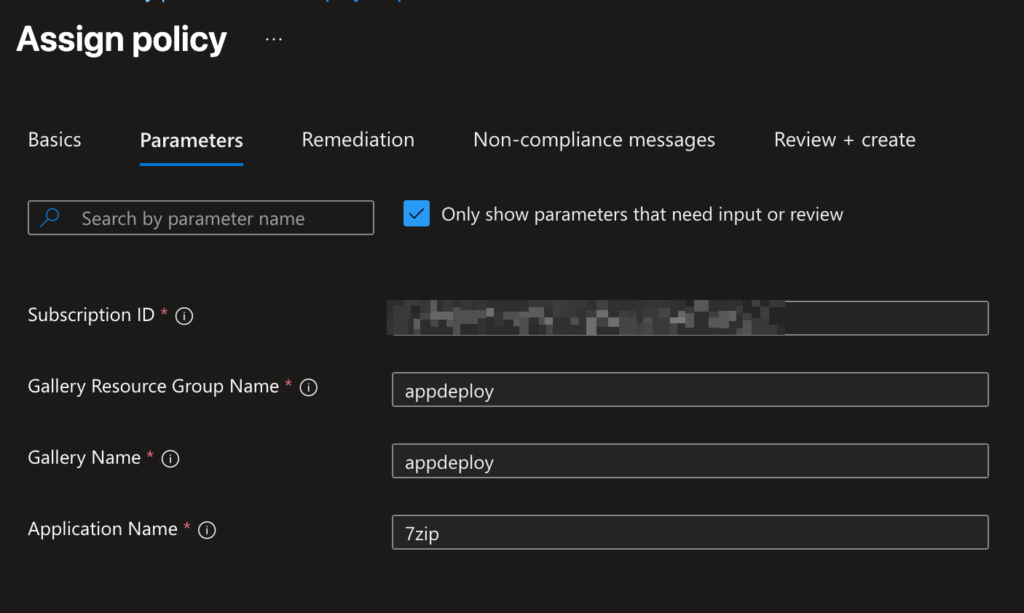
Validate


Terraform Solution
Link: GitHub
/*
###############################################

Polcies for installing an custom agent

Creates:
- Resource Group
- Storage Account for Storing the Zip File (Contains Resources)
- Creates install & uninstall scripts, zip and upload them - 7zip as example
- Azure Compute Gallery & VM Application with Custom Agent
- the final Policy & Remediation to install the VM application

###############################################
*/

# uncomment this if you do not get the subscription id centrally
#data "azurerm_subscription" "current" {}

# ============================================================================
# Resource Group & Storage for Storing Installation Files
# ============================================================================
resource "azurerm_resource_group" "gallery" {
  name     = "rg-gallery-vmapps"
  location = "westeurope"
}

# Storage Account für die Installationspakete
resource "azurerm_storage_account" "vmapps" {
  name                     = "stvmapps${random_string.suffix.result}"
  resource_group_name      = azurerm_resource_group.gallery.name
  location                 = azurerm_resource_group.gallery.location
  account_tier             = "Standard"
  account_replication_type = "LRS"

  tags = {
    purpose = "vm-applications"
  }
}

resource "azurerm_storage_container" "packages" {
  name                  = "packages"
  storage_account_id    = azurerm_storage_account.vmapps.id
  container_access_type = "private"
}

# Random Suffix für eindeutige Namen
resource "random_string" "suffix" {
  length  = 8
  special = false
  upper   = false
}

# ============================================================================
# Create Local PowerShell Installation-Scripts & zip it
# ============================================================================
# install.ps1 - 7-Zip Installation
resource "local_file" "install_script" {
  filename = "${path.module}/scripts/install.ps1"
  content  = <<-EOT
    # 7-Zip Installation Script
    $ErrorActionPreference = "Stop"

    $7zipUrl = "https://www.7-zip.org/a/7z2408-x64.exe"
    $installerPath = "$env:TEMP\7z-installer.exe"

    Write-Host "Downloading 7-Zip..."
    Invoke-WebRequest -Uri $7zipUrl -OutFile $installerPath

    Write-Host "Installing 7-Zip..."
    Start-Process -FilePath $installerPath -ArgumentList "/S" -Wait -NoNewWindow

    Write-Host "Cleaning up..."
    Remove-Item -Path $installerPath -Force

    $regPath = 'HKLM:\SOFTWARE\Microsoft\Windows\CurrentVersion\Uninstall\7-Zip'
    if (Test-Path $regPath) {
      Write-Host "7-Zip installation completed successfully!"
      exit 0
    }
    else {
      Write-Output "7-Zip ist nicht installiert oder der Registry-Pfad existiert nicht."
      exit 1
    }


  EOT
}

# uninstall.ps1 - 7-Zip Deinstallation
resource "local_file" "uninstall_script" {
  filename = "${path.module}/scripts/uninstall.ps1"
  content  = <<-EOT
    # 7-Zip Uninstallation Script
    $ErrorActionPreference = "Stop"

    $uninstallerPath = "C:\Program Files\7-Zip\Uninstall.exe"

    if (Test-Path $uninstallerPath) {
        Write-Host "Uninstalling 7-Zip..."
        Start-Process -FilePath $uninstallerPath -ArgumentList "/S" -Wait -NoNewWindow

        $regPath = 'HKLM:\SOFTWARE\Microsoft\Windows\CurrentVersion\Uninstall\7-Zip'
        if (Test-Path $regPath) {
          Write-Host "7-Zip uninstallation not successful!"
          exit 1
        }
        else {
          Write-Host "7-Zip uninstalled successfully!"
          exit 0
        }

    } else {
        Write-Host "7-Zip is not installed or uninstaller not found."
    }
  EOT
}


data "archive_file" "app_package-pwsh" {
  type        = "zip"
  output_path = "${path.module}/7zip-package-pwsh.zip"

  source {
    content  = local_file.install_script.content
    filename = "install.ps1"
  }

  source {
    content  = local_file.uninstall_script.content
    filename = "uninstall.ps1"
  }

  depends_on = [
    local_file.install_script,
    local_file.uninstall_script
  ]
}


# Upload ZIP to Storage Account
resource "azurerm_storage_blob" "app_package-pwsh" {
  name                   = "7zip-package-pwsh-${formatdate("YYYYMMDDhhmmss", timestamp())}.zip"
  storage_account_name   = azurerm_storage_account.vmapps.name
  storage_container_name = azurerm_storage_container.packages.name
  type                   = "Block"
  source                 = data.archive_file.app_package-pwsh.output_path
}

# Generate SAS Token for Blob-Access
data "azurerm_storage_account_blob_container_sas" "package_sas-pwsh" {
  connection_string = azurerm_storage_account.vmapps.primary_connection_string
  container_name    = azurerm_storage_container.packages.name
  https_only        = true

  start  = timestamp()
  expiry = timeadd(timestamp(), "8760h") # 1 year

  permissions {
    read   = true
    add    = false
    create = false
    write  = false
    delete = false
    list   = true
  }
}

# ============================================================================
# AZURE COMPUTE GALLERY
# ============================================================================
resource "azurerm_shared_image_gallery" "main" {
  name                = "gallery_vmapps_${random_string.suffix.result}"
  resource_group_name = azurerm_resource_group.gallery.name
  location            = azurerm_resource_group.gallery.location
  description         = "Compute Gallery für VM Applications"

  tags = {
    environment = "production"
    purpose     = "vm-applications"
  }
}

# ============================================================================
# VM APPLICATION DEFINITION
# ============================================================================
resource "azurerm_gallery_application" "sevenzip-pwsh" {
  name              = "7zip-pwsh"
  gallery_id        = azurerm_shared_image_gallery.main.id
  location          = azurerm_resource_group.gallery.location
  supported_os_type = "Windows"
  description       = "7-Zip File Archiver for Windows VMs"

  tags = {
    application = "7zip"
    version     = "24.08"
  }
}


# VM APPLICATION VERSION
resource "azurerm_gallery_application_version" "sevenzip_v1-pwsh" {
  name                   = "1.0.0"
  gallery_application_id = azurerm_gallery_application.sevenzip-pwsh.id
  location               = azurerm_resource_group.gallery.location

  manage_action {
  install = <<EOF
powershell.exe -command "
Rename-Item -Path '.\\${azurerm_gallery_application.sevenzip-pwsh.name}' -NewName 'app.zip';
Expand-Archive -Path '.\\app.zip' -DestinationPath '.\\app';
Set-ExecutionPolicy -ExecutionPolicy RemoteSigned -Scope Process -Force;
powershell.exe -ExecutionPolicy Bypass -File '.\\app\\install.ps1';
"
EOF

  remove = <<EOF
powershell.exe -command "
Rename-Item -Path '.\\${azurerm_gallery_application.sevenzip-pwsh.name}' -NewName 'app.zip';
Expand-Archive -Path '.\\app.zip' -DestinationPath '.\\app';
Set-ExecutionPolicy -ExecutionPolicy RemoteSigned -Scope Process -Force;
powershell.exe -ExecutionPolicy Bypass -File '.\\app\\uninstall.ps1';
"
EOF
}

  source {
    media_link = "${azurerm_storage_blob.app_package-pwsh.url}
    ${data.azurerm_storage_account_blob_container_sas.package_sas-pwsh.sas}"
  }

  target_region {
    name                   = azurerm_resource_group.gallery.location
    regional_replica_count = 1
  }

  tags = {
    version = "1.0.0"
  }
}

# ============================================================================
# AZURE POLICY: VM APPLICATION ERZWINGEN
# ============================================================================
# Custom Policy Definition - basierend auf Microsoft ARM Template Struktur
resource "azurerm_policy_definition" "deploy_7zip" {
  name         = "deploy-7zip-on-windows-vms"
  policy_type  = "Custom"
  mode         = "Indexed"
  display_name = "Deploy 7-Zip on Windows VMs"
  description  = "Automatically deploys 7-Zip VM Application to all Windows VMs using ARM template deployment"

  metadata = <<METADATA
    {
      "category": "Compute",
      "version": "1.0.0"
    }
METADATA

  parameters = <<PARAMETERS
    {
      "subscriptionId": {
        "type": "String",
        "metadata": {
          "displayName": "Subscription ID",
          "description": "The subscription ID where the gallery is located"
        }
      },
      "resourceGroupName": {
        "type": "String",
        "metadata": {
          "displayName": "Gallery Resource Group Name",
          "description": "The resource group name where the gallery is located"
        }
      },
      "galleryName": {
        "type": "String",
        "metadata": {
          "displayName": "Gallery Name",
          "description": "The name of the Compute Gallery"
        }
      },
      "applicationName": {
        "type": "String",
        "metadata": {
          "displayName": "Application Name",
          "description": "The name of the VM Application"
        }
      },
      "applicationVersion": {
        "type": "String",
        "defaultValue": "1.0.0",
        "metadata": {
          "displayName": "Application Version",
          "description": "The version of the VM Application to deploy"
        }
      }
    }
PARAMETERS

  policy_rule = <<POLICY_RULE
    {
      "if": {
        "allOf": [
          {
            "field": "type",
            "equals": "Microsoft.Compute/virtualMachines"
          },
          {
            "field": "Microsoft.Compute/virtualMachines/storageProfile.osDisk.osType",
            "equals": "Windows"
          }
        ]
      },
      "then": {
        "effect": "deployIfNotExists",
        "details": {
          "type": "Microsoft.Compute/virtualMachines",
          "name": "[field('name')]",
          "roleDefinitionIds": [
            "/providers/Microsoft.Authorization/roleDefinitions/b24988ac-6180-42a0-ab88-20f7382dd24c"
          ],
          "existenceCondition": {
            "allOf": [
              {
                "count": {
                  "field": "Microsoft.Compute/virtualMachines/applicationProfile.galleryApplications[*]",
                  "where": {
                    "field": "Microsoft.Compute/virtualMachines/applicationProfile.galleryApplications[*].packageReferenceId",
                    "equals": "[parameters('applicationVersion')]"
                  }
                },
                "greater": 0
              }
            ]
          },
          "deployment": {
            "properties": {
              "mode": "incremental",
              "parameters": {
                "vmName": {
                  "value": "[field('name')]"
                },
                "location": {
                  "value": "[field('location')]"
                },
                "subscriptionId": {
                  "value": "[parameters('subscriptionId')]"
                },
                "resourceGroupName": {
                  "value": "[parameters('resourceGroupName')]"
                },
                "galleryName": {
                  "value": "[parameters('galleryName')]"
                },
                "applicationName": {
                  "value": "[parameters('applicationName')]"
                },
                "applicationVersion": {
                  "value": "[parameters('applicationVersion')]"
                }
              },
              "template": {
                "$schema": "https://schema.management.azure.com/schemas/2019-04-01/deploymentTemplate.json#",
                "contentVersion": "1.0.0.0",
                "parameters": {
                  "vmName": {
                    "type": "string"
                  },
                  "location": {
                    "type": "string"
                  },
                  "subscriptionId": {
                    "type": "string"
                  },
                  "resourceGroupName": {
                    "type": "string"
                  },
                  "galleryName": {
                    "type": "string"
                  },
                  "applicationName": {
                    "type": "string"
                  },
                  "applicationVersion": {
                    "type": "string"
                  }
                },
                "variables": {
                  "packageReferenceId": "[format(
                  '/subscriptions/{0}/resourceGroups/{1}/providers/Microsoft.Compute/galleries/{2}/applications/{3}/versions/{4}',
                  parameters('subscriptionId'),
                  parameters('resourceGroupName'),
                  parameters('galleryName'),
                  parameters('applicationName'),
                  parameters('applicationVersion'))]"
                },
                "resources": [
                  {
                    "type": "Microsoft.Compute/virtualMachines/VMapplications",
                    "apiVersion": "2021-07-01",
                    "name": "[concat(parameters('vmName'), '/', parameters('applicationName'))]",
                    "location": "[parameters('location')]",
                    "properties": {
                      "packageReferenceId": "[variables('packageReferenceId')]"
                    }
                  }
                ]
              }
            }
          }
        }
      }
    }
POLICY_RULE
}

# Policy Assignment auf Subscription-Level
resource "azurerm_subscription_policy_assignment" "deploy_7zip" {
  name                 = "deploy-7zip-windows-vms"
  subscription_id      = data.azurerm_subscription.current.id
  policy_definition_id = azurerm_policy_definition.deploy_7zip.id
  display_name         = "Deploy 7-Zip on all Windows VMs"
  description          = "Automatically deploys 7-Zip to all Windows VMs in the subscription"
  location             = azurerm_resource_group.gallery.location

  identity {
    type = "SystemAssigned"
  }

  parameters = jsonencode({
    subscriptionId = {
      value = data.azurerm_subscription.current.id
    }
    resourceGroupName = {
      value = azurerm_resource_group.gallery.name
    }
    galleryName = {
      value = azurerm_shared_image_gallery.main.name
    }
    applicationName = {
      value = azurerm_gallery_application.sevenzip-pwsh.name
    }
    applicationVersion = {
      value = "1.0.0"
    }
  })
}

# Role Assignment für die Policy Identity
resource "azurerm_role_assignment" "policy_vm_contributor" {
  scope                = data.azurerm_subscription.current.id
  role_definition_name = "Contributor"
  principal_id         = azurerm_subscription_policy_assignment.deploy_7zip.identity[0].principal_id
}

resource "azurerm_subscription_policy_remediation" "this" {
  name                           = "remediate-7zip"
  subscription_id                = data.azurerm_subscription.current.id
  policy_assignment_id           = azurerm_subscription_policy_assignment.deploy_7zip.id
  policy_definition_reference_id = azurerm_subscription_policy_assignment.deploy_7zip.policy_definition_id
  resource_discovery_mode        = "ReEvaluateCompliance"

  depends_on = [
    azurerm_role_assignment.policy_vm_contributor
  ]
}Real World Example: SCCM Agent Deployment
While this guide uses 7-Zip as a simple demonstration, the real power of this pattern shines when deploying enterprise agents like SCCM/ConfigMgr Client.
Adapting for SCCM Agent
To deploy the SCCM agent instead of 7-Zip, you need to adjust three things:
- The installation package (ccmsetup.exe and prerequisites)
- The installation script (with SCCM-specific parameters)
- Optional configuration files (client.msi properties, site codes, etc.)
The infrastructure (VM Application, Policy, Terraform) remains identical.
5. Common Issues & Troubleshooting
5.1 VM Application Installation Failed
- Check VM Application logs in `C:\WindowsAzure\Logs`
- Verify SAS token hasn’t expired
- Ensure proper exit codes (0 = success)
5.2 Policy Not Triggering
- Verify role assignments are complete (can take 15+ minutes)
- Check policy assignment scope
- Force compliance scan: `Start-AzPolicyRemediation`
5.3 Version Updates
- Create new VM Application Version (1.0.1, 1.0.2)
- Update policy parameter `applicationVersion`
- Trigger remediation
6. Built-In Agent Deployments (Alternative / Complementary)
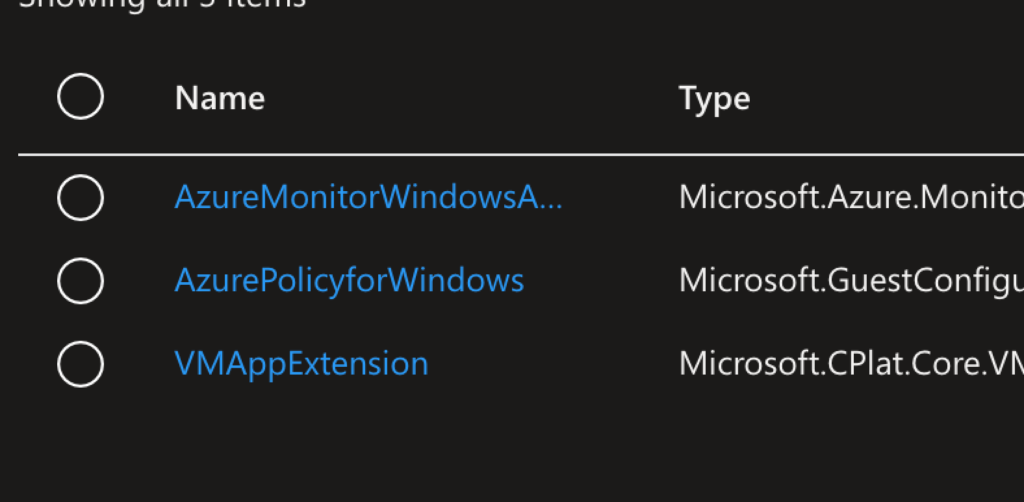
While the focus of this post is on custom agent deployment, Azure also provides built-in policies that simplify common scenarios.
I built and tested Terraform deployments for each of these.
6.1 Azure Monitor Agent (AMA)
Automatically installs the AMA extension on all supported VMs.
Policy assignment ensures monitoring consistency without manual configuration.
/*
###############################################

Polcies for installing the Azure Monitor Agent (AMA)
https://learn.microsoft.com/en-us/azure/azure-monitor/agents/azure-monitor-agent-overview

Built-In Policies:
- Configure Linux virtual machines to run Azure Monitor Agent with system-assigned managed identity-based authentication
(a4034bc6-ae50-406d-bf76-50f4ee5a7811)
- Configure Windows virtual machines to run Azure Monitor Agent using system-assigned managed identity
(ca817e41-e85a-4783-bc7f-dc532d36235e)

###############################################
*/

# uncomment this if you do not get the subscription id centrally
#data "azurerm_subscription" "current" {}

###############################################
### Azure Policies for Extensions
###############################################
# Azure Monitor Agent - Linux
resource "azurerm_subscription_policy_assignment" "ama_linux" {
  name                 = "deploy-ama-linux"
  policy_definition_id = "/providers/Microsoft.Authorization/policyDefinitions/a4034bc6-ae50-406d-bf76-50f4ee5a7811"
  subscription_id      = data.azurerm_subscription.current.id
  location             = "westeurope"
  display_name         = "Deploy Azure Monitor Agent - Linux"

  identity {
    type = "SystemAssigned"
  }
}

# Azure Monitor Agent - Windows
resource "azurerm_subscription_policy_assignment" "ama_windows" {
  name                 = "deploy-ama-windows"
  policy_definition_id = "/providers/Microsoft.Authorization/policyDefinitions/ca817e41-e85a-4783-bc7f-dc532d36235e"
  subscription_id      = data.azurerm_subscription.current.id
  location             = "westeurope"
  display_name         = "Deploy Azure Monitor Agent - Windows"

  identity {
    type = "SystemAssigned"
  }
}

###############################################
### Role Assignments
###############################################
resource "azurerm_role_assignment" "ama_linux_vm_contributor" {
  scope                = data.azurerm_subscription.current.id
  role_definition_name = "Virtual Machine Contributor"
  principal_id         = azurerm_subscription_policy_assignment.ama_linux.identity[0].principal_id
}

resource "azurerm_role_assignment" "ama_windows_vm_contributor" {
  scope                = data.azurerm_subscription.current.id
  role_definition_name = "Virtual Machine Contributor"
  principal_id         = azurerm_subscription_policy_assignment.ama_windows.identity[0].principal_id
}

###############################################
### Remediations
###############################################
# Azure Monitor Agent Linux Remediation
resource "azurerm_subscription_policy_remediation" "ama_linux" {
  name                           = "remediate-ama-linux"
  subscription_id                = data.azurerm_subscription.current.id
  policy_assignment_id           = azurerm_subscription_policy_assignment.ama_linux.id
  policy_definition_reference_id = azurerm_subscription_policy_assignment.ama_linux.policy_definition_id
  resource_discovery_mode        = "ReEvaluateCompliance"

  depends_on = [
    azurerm_role_assignment.ama_linux_vm_contributor
  ]
}

# Azure Monitor Agent Windows Remediation
resource "azurerm_subscription_policy_remediation" "ama_windows" {
  name                           = "remediate-ama-windows"
  subscription_id                = data.azurerm_subscription.current.id
  policy_assignment_id           = azurerm_subscription_policy_assignment.ama_windows.id
  policy_definition_reference_id = azurerm_subscription_policy_assignment.ama_windows.policy_definition_id
  resource_discovery_mode        = "ReEvaluateCompliance"

  depends_on = [
    azurerm_role_assignment.ama_windows_vm_contributor
  ]
}6.2 Microsoft Defender for Endpoint (MDE)
Ensures Defender’s endpoint protection agent is present.
Azure Policy handles installation and remediation.
/*
###############################################

Polcies for installing the Defender for Endpoint Agent (EDR)
https://learn.microsoft.com/en-us/defender-endpoint/microsoft-defender-endpoint

Requires: Defender for Endpoint Plan

Built-In Policies:
- [Preview]: Deploy Microsoft Defender for Endpoint agent on Windows virtual machines
(1ec9c2c2-6d64-656d-6465-3ec3309b8579)
- [Preview]: Deploy Microsoft Defender for Endpoint agent on Linux virtual machines
(d30025d0-6d64-656d-6465-67688881b632)

###############################################
*/

# uncomment this if you do not get the subscription id centrally
#data "azurerm_subscription" "current" {}

###############################################
### Azure Policies for Extensions
###############################################

# Microsoft Defender for Endpoint - Windows
resource "azurerm_subscription_policy_assignment" "mde_windows" {
  name                 = "deploy-mde-windows"
  policy_definition_id = "/providers/Microsoft.Authorization/policyDefinitions/1ec9c2c2-6d64-656d-6465-3ec3309b8579"
  subscription_id      = data.azurerm_subscription.current.id
  location             = "westeurope"
  display_name         = "Deploy Defender for Endpoint Agent - Windows"

  identity {
    type = "SystemAssigned"
  }
}

# Microsoft Defender for Endpoint - Linux
resource "azurerm_subscription_policy_assignment" "mde_linux" {
  name                 = "deploy-mde-linux"
  policy_definition_id = "/providers/Microsoft.Authorization/policyDefinitions/d30025d0-6d64-656d-6465-67688881b632"
  subscription_id      = data.azurerm_subscription.current.id
  location             = "westeurope"
  display_name         = "Deploy Defender for Endpoint Agent - Linux"

  identity {
    type = "SystemAssigned"
  }
}


###############################################
### Role Assignments
###############################################
resource "azurerm_role_assignment" "mde_windows_vm_contributor" {
  scope                = data.azurerm_subscription.current.id
  role_definition_name = "Contributor"
  principal_id         = azurerm_subscription_policy_assignment.mde_windows.identity[0].principal_id
}

resource "azurerm_role_assignment" "mde_linux_vm_contributor" {
  scope                = data.azurerm_subscription.current.id
  role_definition_name = "Contributor"
  principal_id         = azurerm_subscription_policy_assignment.mde_linux.identity[0].principal_id
}

###############################################
### Remediations
###############################################

# Defender for Endpoint Windows Remediation
resource "azurerm_subscription_policy_remediation" "mde_windows" {
  name                           = "remediate-mde-windows"
  subscription_id                = data.azurerm_subscription.current.id
  policy_assignment_id           = azurerm_subscription_policy_assignment.mde_windows.id
  policy_definition_reference_id = azurerm_subscription_policy_assignment.mde_windows.policy_definition_id
  resource_discovery_mode        = "ReEvaluateCompliance"

  depends_on = [
    azurerm_role_assignment.mde_windows_vm_contributor
  ]
}

# Defender for Endpoint Linux Remediation
resource "azurerm_subscription_policy_remediation" "mde_linux" {
  name                           = "remediate-mde-linux"
  subscription_id                = data.azurerm_subscription.current.id
  policy_assignment_id           = azurerm_subscription_policy_assignment.mde_linux.id
  policy_definition_reference_id = azurerm_subscription_policy_assignment.mde_linux.policy_definition_id
  resource_discovery_mode        = "ReEvaluateCompliance"

  depends_on = [
    azurerm_role_assignment.mde_linux_vm_contributor
  ]
}6.3 Guest Attestation
Validates VM integrity and compliance with security baselines.
Policy ensures the attestation extension is installed where required.
/*
###############################################

Polcies for installing the Azure Guest Configuration Extension (AzurePolicy)
https://docs.azure.cn/en-us/governance/policy/concepts/guest-configuration
https://learn.microsoft.com/en-us/azure/virtual-machines/extensions/guest-configuration?tabs=portal

Built-In Policies:
- Deploy the Windows Guest Configuration extension to enable Guest Configuration assignments on Windows VMs
(385f5831-96d4-41db-9a3c-cd3af78aaae6)
- Deploy the Linux Guest Configuration extension to enable Guest Configuration assignments on Linux VMs
(331e8ea8-378a-410f-a2e5-ae22f38bb0da)

###############################################
*/

# uncomment this if you do not get the subscription id centrally
#data "azurerm_subscription" "current" {}

###############################################
### Azure Policies for Extensions
###############################################
# Guest Configuration Extension - Windows
resource "azurerm_subscription_policy_assignment" "guest_config_windows" {
  name                 = "deploy-guest-config-windows"
  policy_definition_id = "/providers/Microsoft.Authorization/policyDefinitions/385f5831-96d4-41db-9a3c-cd3af78aaae6"
  subscription_id      = data.azurerm_subscription.current.id
  location             = "westeurope"
  display_name         = "Deploy Guest Configuration Agent - Windows"

  identity {
    type = "SystemAssigned"
  }
}

# Guest Configuration Extension - Linux
resource "azurerm_subscription_policy_assignment" "guest_config_linux" {
  name                 = "deploy-guest-config-linux"
  policy_definition_id = "/providers/Microsoft.Authorization/policyDefinitions/331e8ea8-378a-410f-a2e5-ae22f38bb0da"
  subscription_id      = data.azurerm_subscription.current.id
  location             = "westeurope"
  display_name         = "Deploy Guest Configuration Agent - Linux"

  identity {
    type = "SystemAssigned"
  }
}

###############################################
### Role Assignments
###############################################
resource "azurerm_role_assignment" "guest_config_windows_vm_contributor" {
  scope                = data.azurerm_subscription.current.id
  role_definition_name = "Contributor"
  principal_id         = azurerm_subscription_policy_assignment.guest_config_windows.identity[0].principal_id
}

resource "azurerm_role_assignment" "guest_config_linux_vm_contributor" {
  scope                = data.azurerm_subscription.current.id
  role_definition_name = "Contributor"
  principal_id         = azurerm_subscription_policy_assignment.guest_config_linux.identity[0].principal_id
}

###############################################
### Remediations
###############################################
# Guest Configuration Windows Remediation
resource "azurerm_subscription_policy_remediation" "guest_config_windows" {
  name                           = "remediate-guest-config-windows"
  subscription_id                = data.azurerm_subscription.current.id
  policy_assignment_id           = azurerm_subscription_policy_assignment.guest_config_windows.id
  policy_definition_reference_id = azurerm_subscription_policy_assignment.guest_config_windows.policy_definition_id
  resource_discovery_mode        = "ReEvaluateCompliance"

  depends_on = [
    azurerm_role_assignment.guest_config_windows_vm_contributor
  ]
}

# Guest Configuration Linux Remediation
resource "azurerm_subscription_policy_remediation" "guest_config_linux" {
  name                           = "remediate-guest-config-linux"
  subscription_id                = data.azurerm_subscription.current.id
  policy_assignment_id           = azurerm_subscription_policy_assignment.guest_config_linux.id
  policy_definition_reference_id = azurerm_subscription_policy_assignment.guest_config_linux.policy_definition_id
  resource_discovery_mode        = "ReEvaluateCompliance"

  depends_on = [
    azurerm_role_assignment.guest_config_linux_vm_contributor
  ]
}These built-ins provide a strong foundation — but custom agents remain necessary for many enterprise workloads.
7. Why Not Use the Custom Script Extension?
You could install an agent using the Custom Script Extension — but it comes with major limitations:
- Only one CustomScriptExtension can be assigned per VM
- No versioning
- No packaging lifecycle
- Poor update/upgrade process
VM Applications avoid these issues and scale better, making them the superior choice for agent deployments.
Pros & Cons
✅ Advantages:
- Automated enforcement across all VMs
- Version control and rollback capability
- No manual intervention needed
- Works with existing VMs and new deployments
- Better than Custom Script Extension (multiple agents possible)
⚠️ Limitations:
- Initial setup complexity
- SAS token management required
- Policy evaluation can take time
- Requires proper RBAC permissions for Policies
8. Conclusion
Azure Policy combined with VM Applications provides a powerful foundation for automated, consistent, and compliant agent deployments across your virtual machine landscape. It’s the ideal approach for:
- Monitoring agents
- Security agents
- Management/configuration agents
- Internal enterprise tools
Built-in policies cover the common cases — but custom agent deployments unlock true flexibility and control.
And with Terraform, the entire process becomes repeatable, scalable, and fully integrated into modern infrastructure-as-code workflows.
If you’re looking to standardize the agent footprint across your Azure VMs, this approach delivers both technical elegance and operational reliability.
Next Steps
Ready to implement this in your environment?
- Clone the repository: Link
- Adapt the Terraform for your agent
- Test in a dev subscription
- Roll out to prod
Questions or feedback? Drop a comment below or reach out on LinkedIn.
