
A Claude Code skill that stops you reading retirement notices for services you don’t use.
How this started
Azure publishes a lot of updates. Retirements, security advisories, pricing changes, GA announcements, public previews, features in development — there are dozens of them per month, and they all land in the same feed with equal visual weight.
The problem isn’t that the updates are hard to find. It’s that most of them don’t matter for your specific environment. If you’re not running Azure SQL Database Basic tier, the Basic tier retirement notice is just noise. If you don’t have a single AKS cluster, every TLS deprecation notice for AKS goes straight into the ignore pile — or worse, you read it carefully, write it down somewhere, and then discover three weeks later that you never had an AKS cluster to begin with.
I kept doing this. Reading retirement notices for services I wasn’t running. Flagging pricing changes for regions I wasn’t deployed in. Forwarding advisories to teammates who would reply “we don’t use that.”
The actual question was always the same: which of these updates affects something I actually have deployed? That question has no good answer in the Azure portal. The updates page at azure.microsoft.com/updates is a flat chronological feed. There’s no filter for “only show me things relevant to my subscription.” There’s no integration with your resource inventory. You get everything, and you triage it manually.
So I wrote a skill. It’s called azure-updates.
What native tooling shows you
To be fair to Microsoft, the tooling has improved. The updates page has tag filters now — you can narrow to Retirements, Security, Generally Available, and a handful of other categories. The RSS feed lives at a endpoint under the Microsoft Release Communications API — but getting it to work reliably in automation is its own adventure (more on that in a moment). Azure Service Health in the portal surfaces some impact-relevant signals, though it’s primarily about uptime and incidents rather than planned retirements.
The gaps are specific:
- No environment context. The updates page has no idea what you’re running. It shows you everything.
- No resource-level matching. Even if a retirement affects a service you use, the notice doesn’t tell you which specific resources in which subscriptions need to migrate.
- No prioritization by urgency. A retirement with a 30-day deadline sits next to a preview announcement with no deadline, styled identically.
Why RSS doesn’t work here
The first approach was obvious: fetch the RSS feed, parse it, cross-reference against the Azure resource inventory. Straightforward enough.
The problem is that the RSS feed has no filtering. It returns the full update catalog every time you hit it. In a polling loop — or any automation that runs repeatedly — that becomes a timeout problem. You’re pulling thousands of items when you only care about a narrow tag slice from the last 30 days.
Then I found the Microsoft Release Communications MCP Server. It’s a public HTTP MCP endpoint — no authentication, no rate limits, free — that exposes the same data with OData-style tag filtering built in. Query only Retirements. Query only Security. Get back exactly what you asked for, nothing else. No timeout risk, no parsing overhead. That’s the approach the skill uses.
The tool
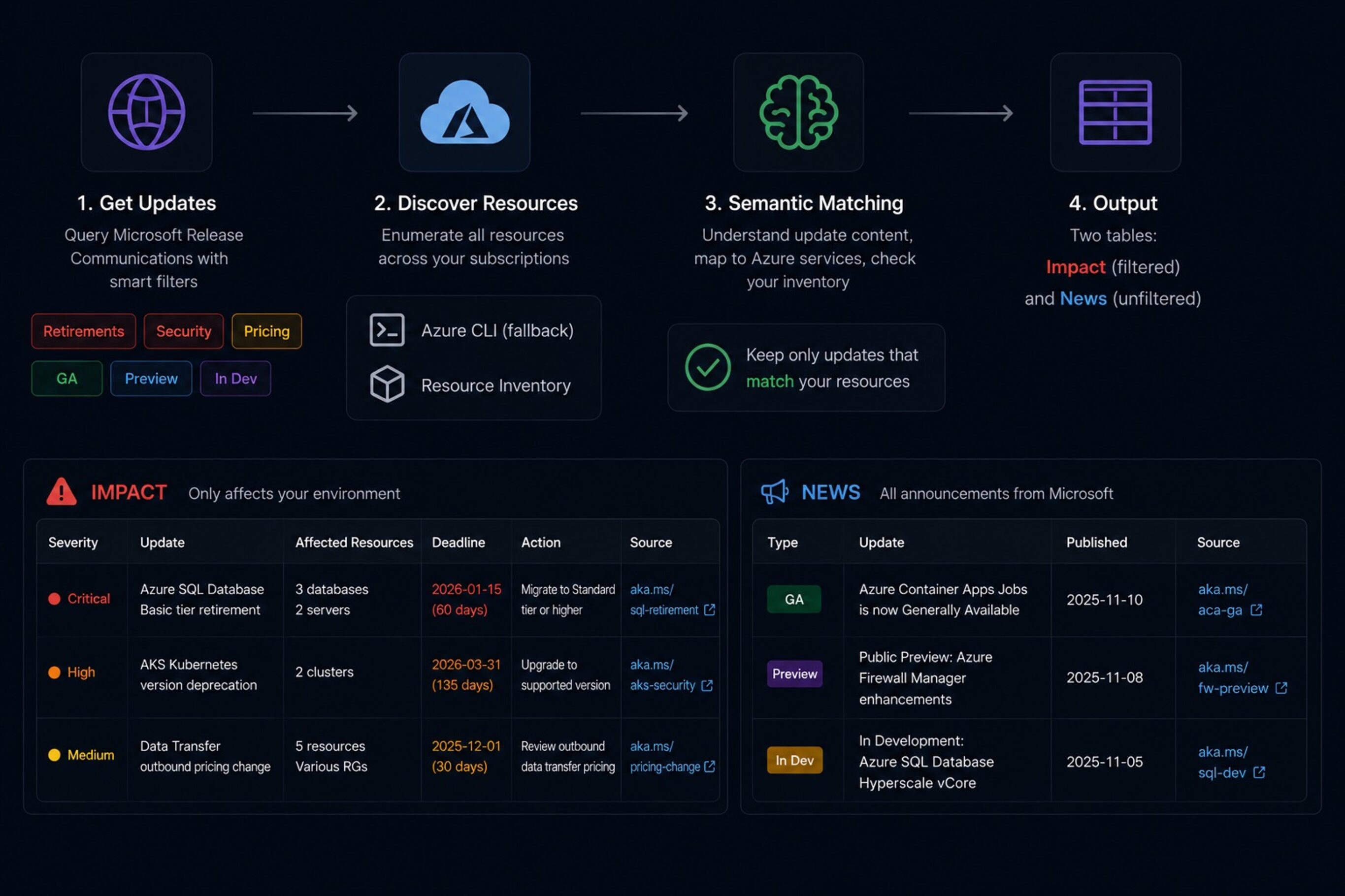
azure-updates is a Claude Code skill that:
- Queries the MRC MCP Server for recent updates, filtered by tag: Retirements, Security, and Pricing & Offerings for the impact bucket; Generally Available, Public Preview, and In Development for the news bucket.
- Discovers all resources across all accessible Azure subscriptions using Azure MCP or Azure CLI as fallback.
- Semantically matches each update against the resource inventory — Claude reads the update title and description, identifies the Azure service, maps it to an ARM resource type, and checks whether any matching resources exist in the environment.
- Discards updates with no matching resources entirely.
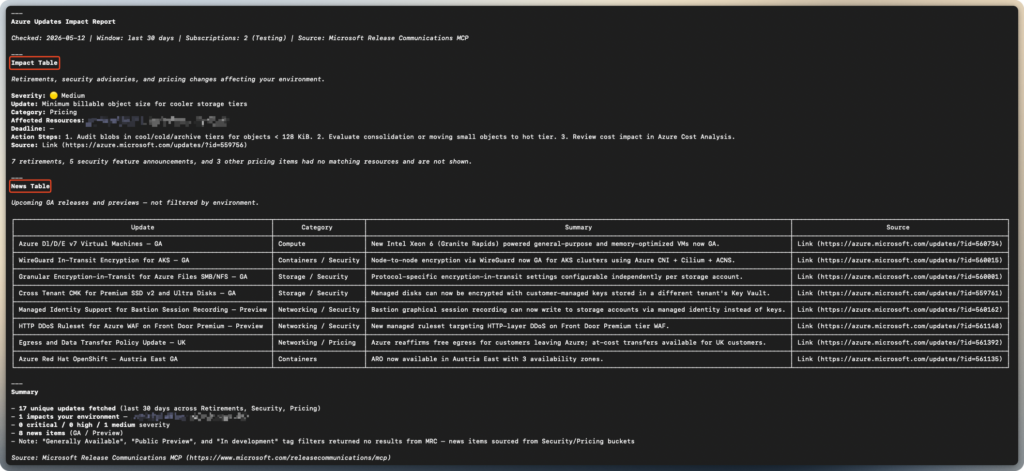
- Produces two tables: an Impact table with environment-filtered retirements, security advisories, and pricing changes; and a News table with unfiltered GA/preview/in-development announcements.
Each row in the Impact table includes severity (🔴 Critical, 🟠 High, 🟡 Medium, 🔵 Low), the specific resource names and resource groups that are affected, any deadline extracted from the update description, concrete action steps generated from the description content, and a source link back to the original update.
The severity logic is simple: Critical if the retirement deadline is within 90 days or the update is an active security incident. High if the deadline is further out or the update is a security advisory. Medium for pricing changes. Low for anything else impacting.
The matching is semantic, not keyword-based. Claude reads the update text, figures out what service it’s about, maps that to an ARM resource type like Microsoft.ContainerService/managedClusters for AKS or Microsoft.Sql/servers/databases for Azure SQL Database, and then checks the inventory. This handles cases where the update title says “Azure Kubernetes Service” and your resource is typed as microsoft.containerservice/managedclusters — no exact string matching required.
Running it
Prerequisites:
Azure MCP Server:
The skill uses the Azure MCP Server to discover resources across your subscriptions — this is what makes the environment matching work. Install it as a Claude Code plugin (recommended):
claude plugin install azureOr add it manually to your Claude Code config:
"mcpServers": {
    "azure": {
      "command": "npx",
      "args": ["-y", "@azure/mcp@latest", "server", "start"]
    }
}Or via CLI:
claude mcp add azure npx -- -y @azure/mcp@latest server startThe skill falls back to Azure CLI if Azure MCP isn’t configured, but the MCP path is faster and gives Claude direct tool access to your resource inventory rather than parsing CLI output.
MRC MCP Server:
Add the MRC (Microsoft Release Communication) MCP Server to your Claude Code configuration once. The server is public and requires no authentication.
"mcpServers": {
    "mrc-mcp": {
      "type": "http",
      "url": "<https://www.microsoft.com/releasecommunications/mcp>"
    }
}You can also add it via the CLI:
claude mcp add --transport http --scope user mrc-mcp <https://www.microsoft.com/releasecommunications/mcp>Restart Claude Code after adding. Also sign in to Azure CLI — az login — so the skill can enumerate your subscriptions and resources.
Copy the skill:
cp -R ./azure-updates ~/.claude/skills/Restart the agent after copying.
Invoke it:
azure-updatesThat checks the last 30 days. For a shorter or longer window:
azure-updates --days 14The skill will enumerate your subscriptions, list all resources across them, query the MRC MCP Server, match against your inventory, and return the two tables.
What it doesn’t do (yet)
Matching is semantic — Claude reasons directly from the ARM type strings in your inventory against the service name in the update. ARM types like Microsoft.Batch/batchAccounts are readable enough that even unlisted services can match correctly. That said, for genuinely ambiguous cases (multiple Azure services sharing an ARM provider, or updates that describe a feature rather than a named service), Claude may miss a match or make a wrong call. The skill errs toward false positives in ambiguous cases rather than silently dropping a retirement notice that might matter.
It doesn’t yet send notifications or run on a schedule — it’s on-demand. Running it once a week manually is the intended workflow for now.
It also doesn’t pull from Azure Service Health, which has its own API and covers a partially overlapping set of signals (mainly incident and degradation notices rather than planned retirements). That could be a useful addition.
Where to get it
The skill is in the public skills repo: github.com/simon-vedder/skills/azure-updates. MIT license. Requires Claude Code, Azure CLI signed in, and the MRC MCP Server configured as above.
Leave a Reply