
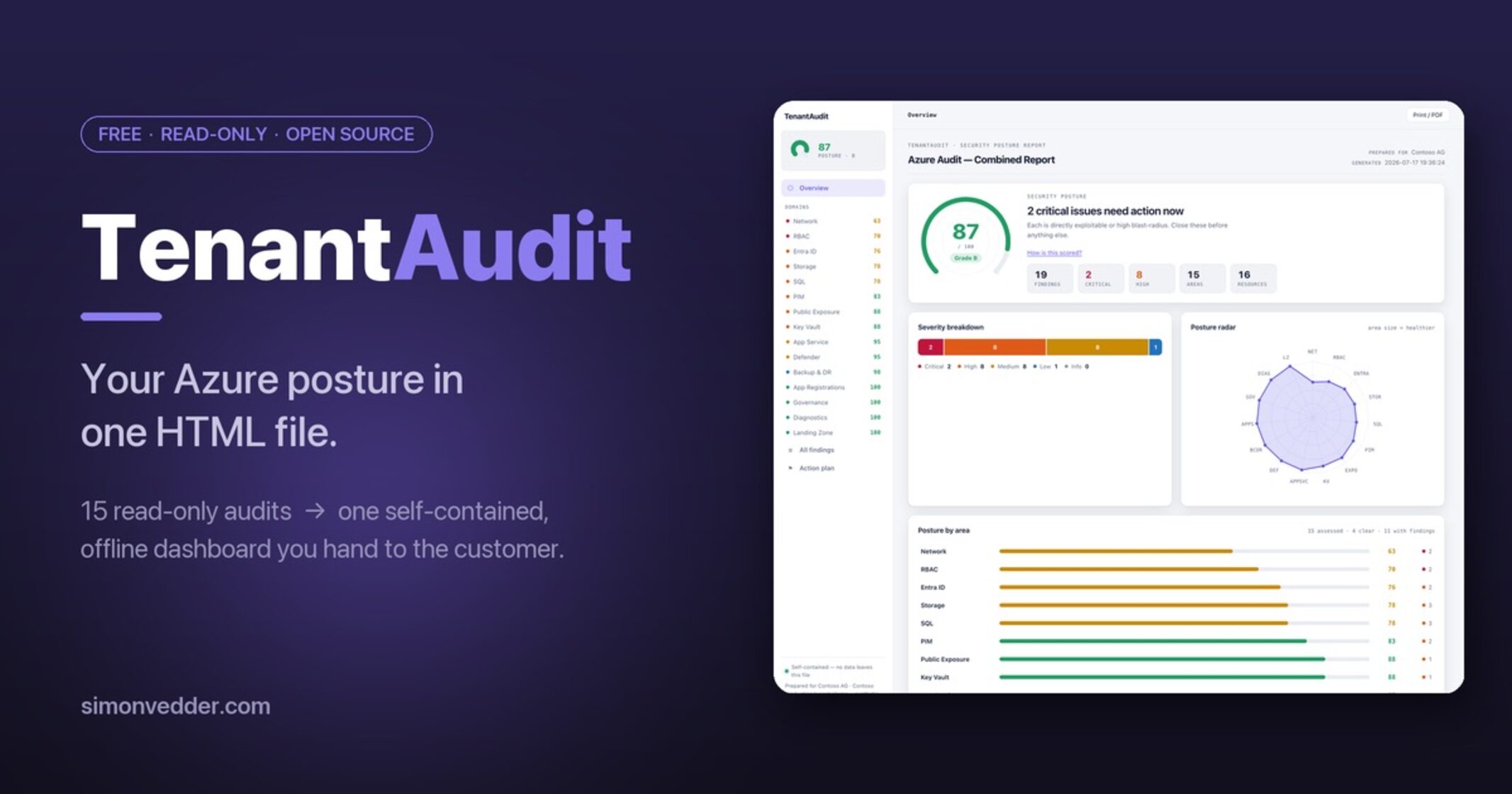
A free, read-only audit toolkit that turns a tenant scan into a single dashboard you can hand to the customer.
Finding the problems in an Azure tenant is the easy afternoon. Privileged roles nobody remembers granting, NSGs wide open to the internet, storage accounts still talking plain HTTP, Key Vaults with purge protection quietly switched off — if you know where to look, none of it hides well.
The report is what used to ruin the week. Every finding sits in a different portal blade, half of them behind access the customer has and I don’t, so it all collapses into a spreadsheet nobody opens or a folder of screenshots with red boxes drawn on them. Throwaway work — next tenant, same grind from zero.
So I stopped doing it by hand. TenantAudit is one command that spits out one HTML file: read-only, self-contained, opens offline. I email it, the customer clicks through their own posture, and we spend the call on fixes instead of “can you share your screen again.” Free, open source, and it never touches your tenant. Here’s what it does — and why it looks the way it does.
What the platform already shows you
To be fair to Microsoft: the signals are mostly there. Defender for Cloud has a secure score and a long list of recommendations. The Entra portal will tell you who holds Global Administrator. A storage account shows its own security settings if you click into it. Azure Policy flags non-compliant resources — if someone set the policies up.
The problem isn’t that the data is missing. It’s three other things.
It lives in your portal. To show a customer their posture, they have to be in the room, or you’re back to screenshots. There’s no artifact to leave behind.
It’s per-service, not per-posture. Secure Score is one number with a wall of recommendations behind it. The storage blade knows about storage; the Entra blade knows about identity. Nobody stitches “here is your tenant, worst first, grouped by area, with the fix” into one view.
And it needs standing access. A point-in-time consulting audit doesn’t want a continuous connection into someone’s tenant — it wants Reader for an afternoon and a clean thing to hand over.
The things you probably aren’t looking at
Most tenants pass the obvious checks and fail the quiet ones. Four that turn up again and again — and, since you’ll ask, exactly how TenantAudit decides each one is a finding.
Standing privileged access
Everyone knows how many Global Admins they have — hopefully. Almost nobody knows how many are permanent.
The distinction isn’t cosmetic. In Entra, a directory role assignment carries an assignmentType: Assigned means the role is live right now, all the time, no expiry; Activated means it’s live only because someone went through PIM — activation, and whatever you gated behind it: approval, MFA, a justification, a time window. Same role, completely different blast radius.
Here’s the path that makes it matter. An attacker phishes a session token for an account that is PIM-eligible for Global Admin but hasn’t activated. They have the user, not the role — GA is dormant, and activating it trips approval, MFA, and the audit log. Now run the same phish against an account holding GA as a standing Assigned role. There’s no activation step to trip. The token is Global Admin, 24/7, silently. Standing access deletes the one choke point PIM exists to give you.
How TenantAudit sees it: it reads roleManagement/directory/roleAssignmentScheduleInstances from Graph, expands the role and principal, and flags every privileged role where assignmentType is Assigned with no endDateTime — permanent-active, not just-in-time. Global Admin scores 8, the other eleven tracked privileged roles 6. If the tenant also has zero eligible assignments, that’s a separate finding: PIM isn’t being used at all.
Storage that talks plain HTTP
EnableHttpsTrafficOnly off. MinimumTlsVersion at 1.0. AllowSharedKeyAccess on. None of these make the account public — it can be firewalled to a single subnet and still be wrong.
The problem is what crosses the wire. With shared-key access on, the account keys — long-lived, full data-plane, tied to no identity — are valid credentials, and a SAS token derived from them is just a URL. With HTTPS-only off, either can travel over plain HTTP, and any hop between client and account (a proxy, a misconfigured gateway, hostile Wi-Fi) can read it. Capture the key once and you have persistent, unattributable read/write to the data — no sign-in, nothing in an identity log to tie it back. TLS 1.0 only widens the same wire.
How TenantAudit sees it: per account from Get-AzStorageAccount it checks EnableHttpsTrafficOnly (off → 7), AllowSharedKeyAccess (on → 4), MinimumTlsVersion (below TLS1_2 → 6) and AllowBlobPublicAccess (on → 6). Hardening flags — deliberately kept separate from whether the account is reachable from the internet, which is a different audit.
SQL with the encryption story half-written
Transparent Data Encryption off on a database old enough to predate it being the default. No auditing target. Defender for SQL never switched on.
Auditing-off is the one that bites in an incident. A compromised SQL login — or an over-scoped app connection string — reads or exfiltrates data, and because no audit target is configured there’s no record of who touched what. You learn you were breached; you can’t say what was taken. TDE-off is the at-rest version: get hold of a backup, or the storage under the database, and the data is readable with no key to crack.
How TenantAudit sees it: per server it checks for an Entra ID admin and whether Entra-only auth is enforced, reads Get-AzSqlServerAudit and flags when none of the Blob / Event Hub / Log Analytics targets is Enabled, checks Defender for SQL (ThreatDetectionState), and walks each database for TDE State (skipping master). Each is a line item; together they’re a database nobody signs off in a review.
The open management port
RDP or SSH open to 0.0.0.0/0 still turns up. It scores a 10 for a reason.
There’s no clever attack to describe here — that’s the point. Expose 3389 to the internet and within minutes automated credential-spray from botnets is hitting it; one reused or weak password is an interactive session on the host, inside your network. It’s the most directly exploitable thing in most tenants, and it usually got there because someone opened it “just to test.”
How TenantAudit sees it: it walks every inbound Allow NSG rule whose source is *, 0.0.0.0/0, Internet or Any, and matches the destination against a risky-port set — RDP, SSH, WinRM, the database ports, Telnet, FTP — including port ranges that merely span one of them. All-ports scores 10, the interactive-shell ports (RDP/SSH/WinRM/Telnet) 9, the rest 7.
None of this is exotic. That’s the point. It’s the stuff that’s boring to check by hand and therefore doesn’t get checked.
The report
TenantAudit runs 15 read-only audits — RBAC, PIM, Entra ID, app registrations, network exposure, public exposure, storage, SQL, Key Vault, App Service, governance, backup and DR, diagnostic settings, Defender for Cloud, and landing-zone structure — and renders everything into a single HTML file.
Not a table of findings. A dashboard.
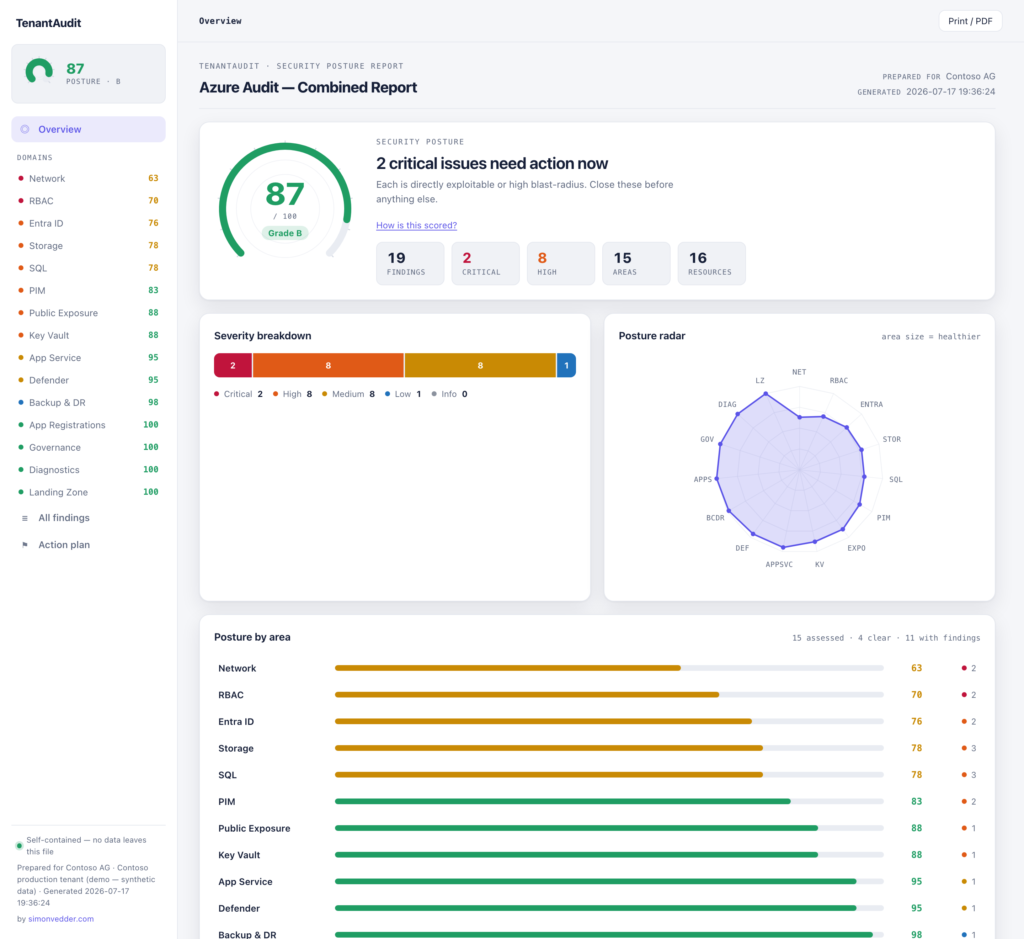
- An overall posture score, 0–100 with a grade, drawn as a radial dial. Each area gets its own score, and areas that were audited and came back clean count as a full 100 — so the number reflects coverage, not just noise.
- Per-area pages — click into Storage or PIM and see that area’s score, its severity mix, and its findings.
- A findings explorer — search, filter, group by area, sort by score, export CSV.
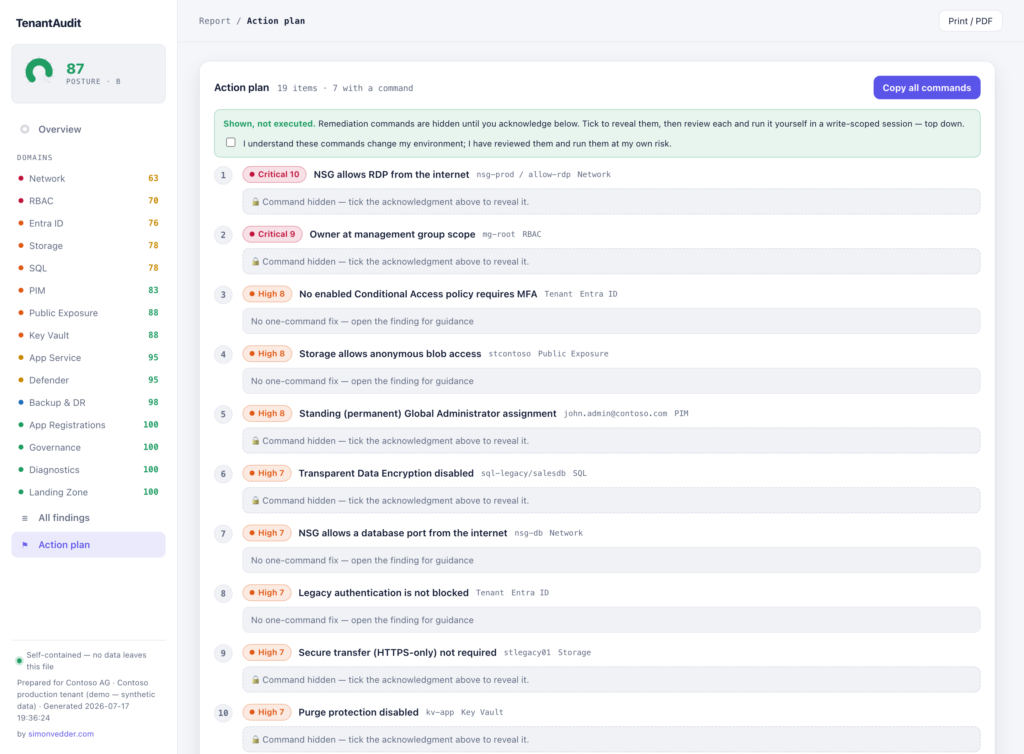
- An action plan — every finding in priority order with its copy-only remediation, and a “copy all” that hands you the whole remediation script as a commented block.
- A Print/PDF mode — one linear executive summary for the person who wants a page, not an app.
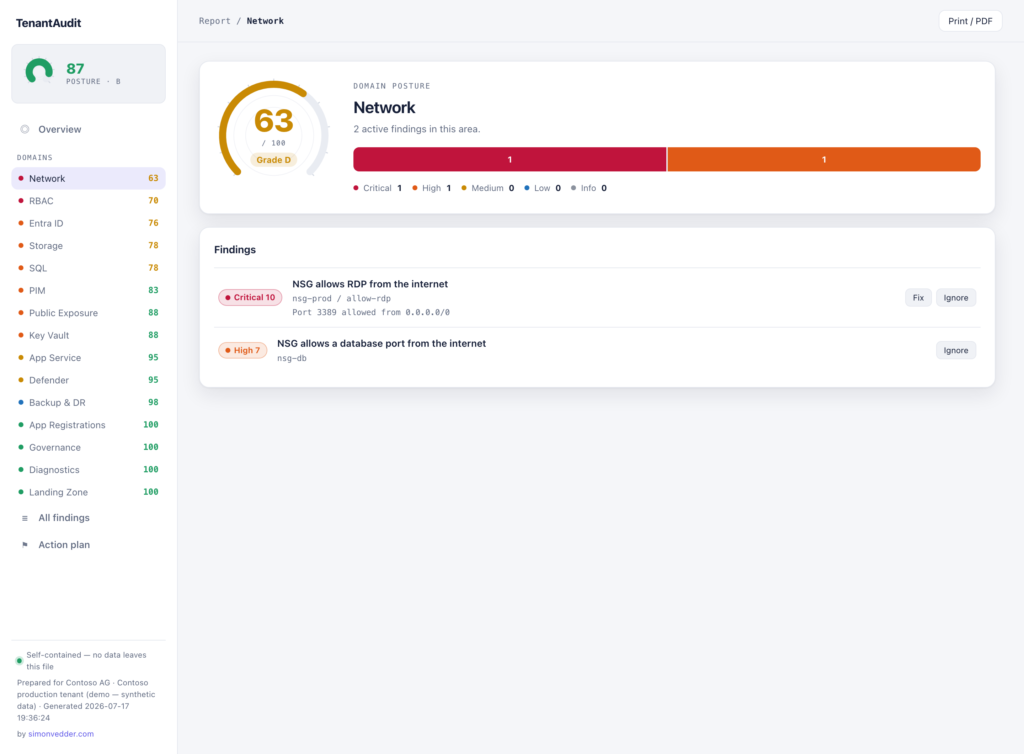
Every finding carries a 1–10 score, and the severity bucket is derived from it, so an open RDP rule (10) and a missing tag (2) can never end up looking the same. The whole thing is inline: no external requests, no fonts from a CDN, no telemetry. One file. It opens with the browser offline. Drop in a branding.json and it renders under your own name, logo and colour.
One deliberate bit of friction: the remediation commands stay hidden until you tick a box saying you understand they change your environment and you’ll review them first. The report never runs anything. It shows you the command and lets you copy it — you run it yourself, in a write-scoped session, after you’ve read it.
Running it
You need two read-only roles — nothing that can change anything:
- Azure resources — Reader on each subscription you want to scan. The Key Vault audit also reads secret/key/cert expiry, which is data-plane, so add Key Vault Reader on those vaults (it degrades gracefully where you don’t). Defender’s view is covered by Reader.
- Entra ID — sign in as Global Reader. That’s enough for every identity audit; under the hood they request the delegated Graph scopes
Directory.Read.All,RoleManagement.Read.Directory,Policy.Read.All,Application.Read.AllandAuditLog.Read.All, consented on first sign-in. Sign-in activity and PIM eligibility additionally need Entra ID P1/P2 — without the licence, those two checks just skip.
Plus PowerShell 7. Both roles are read-only built-ins; TenantAudit never asks for more.
git clone https://github.com/simon-vedder/tenantaudit
cd tenantaudit

# everything, one combined report
./Invoke-AllAudits.ps1

# a subset
./Invoke-AllAudits.ps1 -Include Pim,Storage,Sql,Network

# a single audit
./audits/Invoke-RbacAudit.ps1
It prompts to install the modules it needs — the relevant Az.* modules and Microsoft.Graph.Authentication — or pass -AutoInstallModules. The combined run writes one AllAudits_*.html; each audit also runs on its own and produces its own report. Nothing is written to your tenant.
What it doesn’t do
It’s read-only, and it stays that way. It will never make a change — it shows the fix and trusts you to run it. That’s a feature, but it means TenantAudit is a report, not a remediation engine.
It’s a point-in-time snapshot, not continuous monitoring. Defender for Cloud is still the thing that watches your tenant every day. TenantAudit is the thing you run for an audit, a handover, a “where are we right now.”
And I’ll be straight about the newer audits. PIM, storage and SQL are the most recent additions. They’re read-only, they follow the same pattern as the rest, and I’ve validated the output — but they’ve had fewer miles against real, messy tenants than the older ones. If one misfires on your environment, open an issue. That feedback is exactly what hardens them.
Where to get it
It’s on GitHub: github.com/simon-vedder/tenantaudit. AGPL-3.0 — free to run, free to use in paid client work, free to white-label under your own brand. PowerShell 7 recommended. There’s a fully populated sample report in the repo if you want to click around before you clone.
I built it because I wanted to hand people a clear answer, not a spreadsheet. If it saves you an afternoon, that was the whole point.
Written by Simon Vedder. I work on Azure identity and security posture — if you build something with this, break it, or want an audit run against your own tenant, drop me a line.
Leave a Reply