
A look at Tier Zero exposure paths that don’t show up in the obvious places — and a tool to find them.
Update, September 2026. The script this post describes has been rebuilt. It finds the same exposures and adds what the old one could not: custom roles rated correctly on current Az.Resources, PIM activations told apart from permanent assignments, a score you can argue with, and the command to fix each finding right in the report. It is still one file you download and run, with nothing to install.
./Invoke-RiskyRolesAudit.ps1The tool page · Source on GitHub · The analysis below is unchanged and still stands.
How this started
Last week I released Least Privilege Studio — a tool to help figure out the minimum permissions an app actually needs before you grant them. While building it, I kept thinking about the forward direction: planning new assignments carefully, scoping things tightly, doing it right the first time.
Once it shipped, the obvious next question hit me: that’s great for new permissions, but what about everything that’s already assigned? Across a whole tenant, accumulated over years, possibly by people who aren’t even at the company anymore?
So I started looking. Microsoft Defender for Cloud has plenty to say about identity hygiene. The Entra portal has its blades. PIM has its eligibility model. I went through all of it on a test tenant.
What I came away with was technically correct, technically complete, and yet missing the things that actually keep me up at night. Not the obvious Owner assignments — those are visible. I mean the assignments that hide one layer deeper. The ones an attacker would prefer over a permanent Global Admin any day, because nobody is watching them.
So I wrote a second tool. It’s called RiskyRolesAnalyzer, it’s a single PowerShell script, and the rest of this post explains why I think tools like it are necessary in the first place.
What native tooling actually shows you
To be fair to Microsoft: the platform has plenty of identity hygiene signals. Defender for Cloud surfaces things like “external accounts with owner permissions” or “deprecated accounts with privileged roles.” Entra ID Governance offers periodic access reviews. PIM gives you eligibility models and approval workflows.
But there are gaps. Concrete ones. Here are the ones I keep running into:
- Custom roles with privilege-escalation actions. Defender flags built-in roles. It does not parse a custom role’s
Actionslist to detect that someone bundledMicrosoft.Authorization/roleAssignments/writeinto a “helpdesk helper” role. - Indirect privilege through groups. A group has Owner. Fine. But who’s in that group? Now expand nested groups. Now sort by who is also a guest user. Suddenly your Owner list is three times longer than the Azure portal suggested.
- App registrations with privileged roles and expired credentials. The app looks dead. The role assignment is still live. Anyone with
Application.ReadWrite.Allcan drop in a new secret and inherit the role instantly. - App registrations marked as “Deactivated” in the portal. The toggle that says “this app is deactivated, you can still manage it but no new tokens” — that state lives in a property called
isDisabled, on the application object, only exposed via Microsoft Graph/beta. Most tooling never asks for it. - Disabled users with permanent privileged assignments. The user can’t sign in today, but the assignment is still there. Re-enable the account (which a Helpdesk Admin can do) and they have Global Admin again. The assignment itself should have been removed, not just the account disabled.
None of this is exotic. All of it is in production tenants right now.
The roles you probably don’t watch closely enough
Most people scanning their tenant look for Owner, User Access Administrator, and Global Administrator. That’s the right starting point. It’s also where most people stop. A few that deserve more attention:
Managed Identity Operator
This one sounds boring. It’s not. The role grants Microsoft.ManagedIdentity/userAssignedIdentities/assign/action — the right to attach a user-assigned managed identity to any compatible resource.
The attack pattern looks like this: somewhere in the tenant, a managed identity has high privilege — say, Contributor on a sensitive subscription. Maybe it was set up for a deployment pipeline three years ago and nobody touched it since. As Managed Identity Operator, I create a VM in a low-privilege sandbox, attach that high-privilege managed identity to it, and run az login --identity from inside the VM. I am now operating with the identity’s privilege level. The trail looks like the managed identity ran a script. Nobody is going to look at “Managed Identity Operator” assignments first when something goes wrong.
Virtual Machine Contributor (and friends)
VM Contributor lets you call runCommand on virtual machines. That means executing code as SYSTEM or root inside any VM in scope. If any of those VMs has a managed identity attached with privileged roles — and they often do, for things like Key Vault access or storage operations — then VM Contributor is effectively that role too.
This is the “transitive managed identity access” pattern. The role looks operational. The exposure is identity-level.
Resource Policy Contributor
Allows writing Azure Policy assignments. On its surface that’s compliance work. In practice: someone with this role can assign a DeployIfNotExists policy that creates resources with elevated managed identities, modify Modify effects to alter resource configurations across whole subscriptions, or remove deny assignments that block dangerous operations. It’s not a direct path to Owner, but it’s a path to creating the conditions under which a future path opens up.
Custom roles holding the keys
This one is my favorite, because it’s hidden in plain sight. A few permissions to watch for inside any custom role definition:
Microsoft.Authorization/roleAssignments/write— can grant any role to anyone, including Owner to themselvesMicrosoft.Authorization/roleDefinitions/write— can create a new privileged custom role and self-assign itMicrosoft.Authorization/denyAssignments/delete— can remove the deny assignments that protect critical resources from being modified or deletedMicrosoft.Authorization/elevateAccess/action— promotes the caller to User Access Administrator on the tenant root, bypassing every subscription-level boundary
And on the Entra side:
microsoft.directory/users/password/update— reset any user’s password, including admins. Helpdesk Admin has this for non-admin accounts, but a custom role can be misconfigured to widen this.microsoft.directory/applications/credentials/update— add a new client secret to any application registration, then sign in as that app and inherit whatever it has.microsoft.directory/servicePrincipals/credentials/update— same idea, on service principals directly.microsoft.directory/users/inviteGuest— invite external accounts. By itself low-impact, but combined with group membership management it becomes a persistence mechanism.
The thing about these is that they’re rarely granted intentionally as standalone permissions. They sneak in through wildcards. A custom role written as “this team needs to manage all authorization-related things, just give them Microsoft.Authorization/*” — that wildcard implicitly includes roleAssignments/write. Game over.
The tool
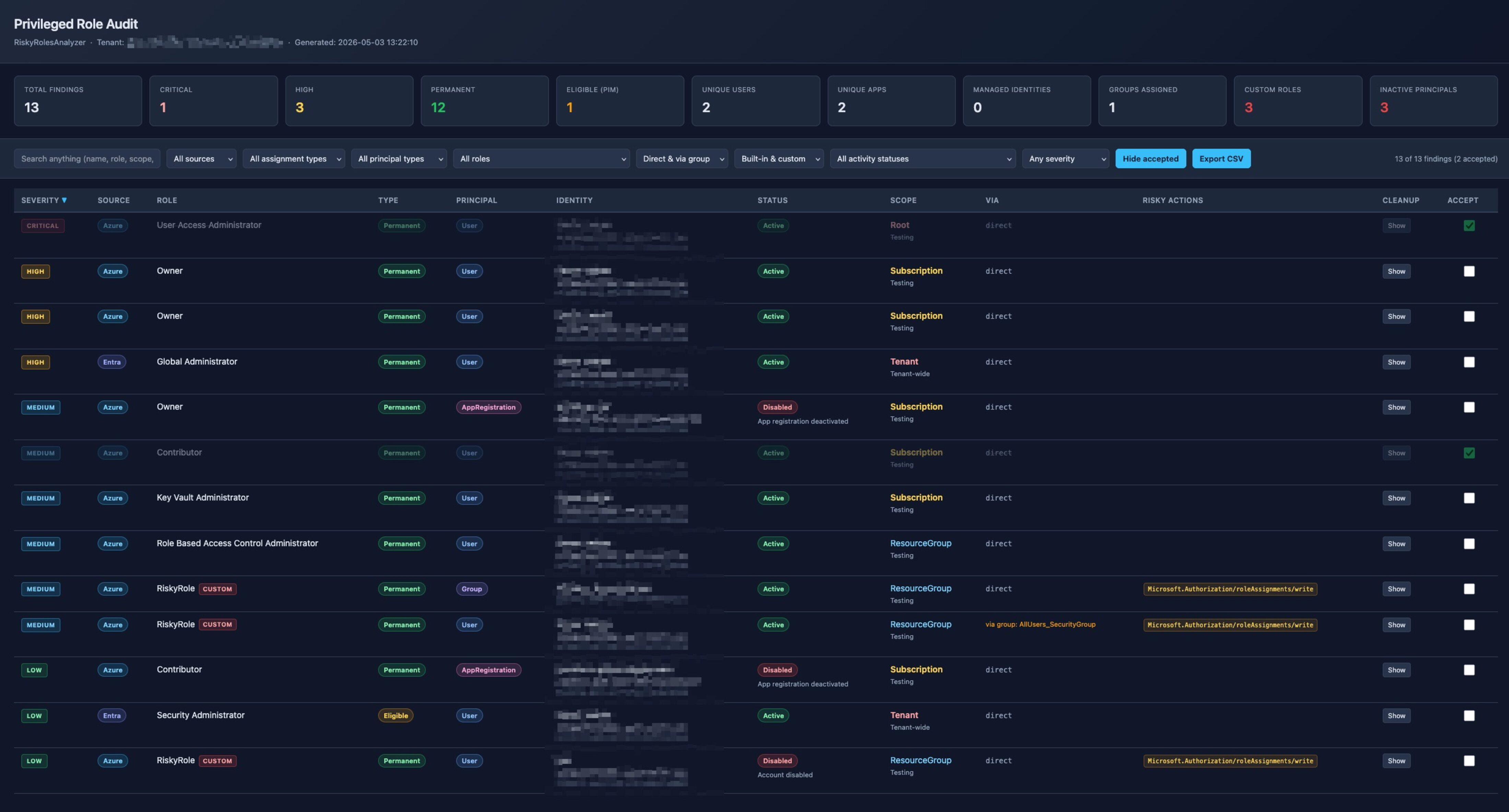
RiskyRolesAnalyzer enumerates Azure RBAC assignments across every enabled subscription in the tenant, plus Entra ID directory roles (active and PIM-eligible), and produces a single self-contained HTML report.
It does a few things explicitly because of the gaps above:
- Scans custom role definitions for the dangerous actions listed above, with wildcard matching, and applies
NotActions/NotDataActionscorrectly - Recursively expands group memberships with cycle protection, so you see who actually has the role through inheritance
- Checks app registration credentials — counts password and certificate credentials, distinguishes “no credentials at all” from “all expired”
- Calls Microsoft Graph
/betafor theisDisabledproperty, so app registrations marked deactivated in the portal are correctly flagged - Assigns a severity rating per finding (Critical / High / Medium / Low) based on role, scope breadth, principal type, and activity status
- Generates a cleanup command per finding — for direct assignments and for group-member findings (where you usually have a choice between removing the user from the group or removing the role from the entire group)
What the report looks like
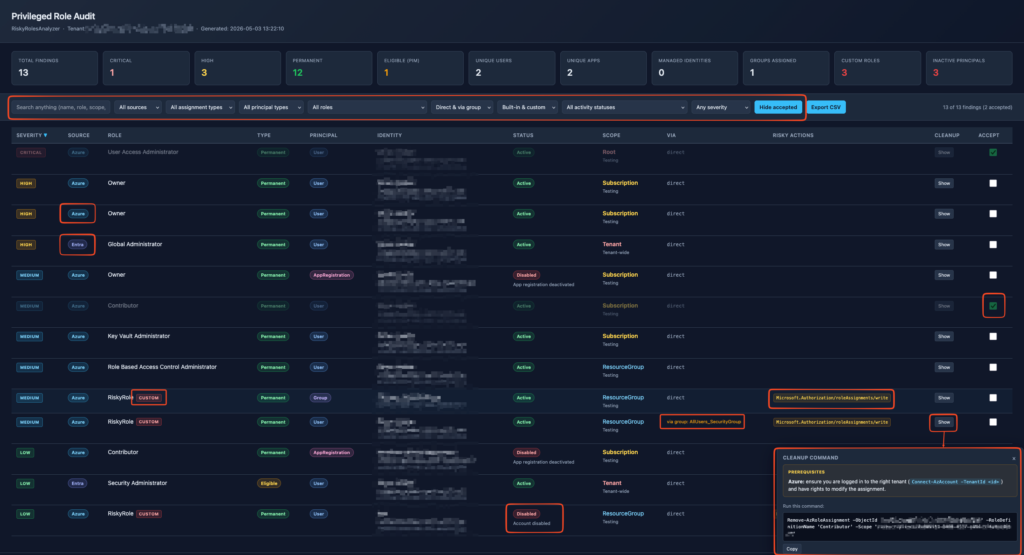
The top of the report has counters — total findings, how many are Critical, how many High, how many are inactive, how many custom roles. Filters cover source (Azure RBAC vs Entra), assignment type (permanent vs PIM-eligible), principal type, role, scope, and severity. There’s a free-text search that covers names, UPNs, object IDs, and AppIds — so you can paste a UUID and find every finding involving that principal.
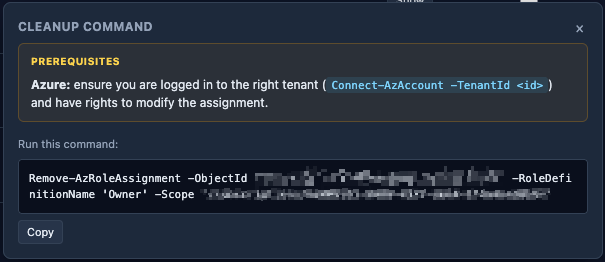
Each row has a “Show” button under Cleanup. Clicking it pops up the suggested commands — and importantly, the prerequisites. If a command needs RoleManagement.ReadWrite.Directory, the popup tells you that and gives you the reconnect command to run first. That detail caught me out in early testing and I’d rather make it obvious than have someone hit a 403 and not know why.
For findings reached through group membership, the popup gives you both options: remove only this principal from the group, or remove the role from the group entirely (which affects every member). It’s a deliberate decision — automating either choice would be wrong, so the tool surfaces both and lets you pick.
The “accept” workflow
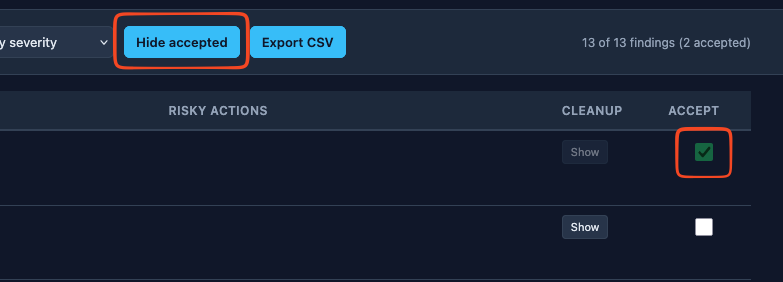
One feature I added late: each row has an “Accept” checkbox. Tick it and the finding is hidden from the active view (toggle “Show accepted” in the toolbar to see them again). The state is session-only — no localStorage, no persistence, deliberately so the report stays a self-contained file you can hand to someone.
This is for the workflow of going through the report with a stakeholder. “Yes, this app legitimately needs Owner here.” Tick. “Yes, this user is meant to be a Global Admin.” Tick. By the end of the session, what’s left on screen is what actually needs action.
Running it
Three modules required: Az.Accounts, Az.Resources, Microsoft.Graph.Authentication. The script offers to install them if missing. Permissions needed:
- Azure: Reader on every subscription you want to audit (Management Group level works too)
- Microsoft Graph:
RoleManagement.Read.Directory,Directory.Read.All,Group.Read.All,Application.Read.All
The script lives in my PowerShell scripts repo on GitHub. Grab it directly:
# Download the script
Invoke-WebRequest `
    -Uri 'https://raw.githubusercontent.com/simon-vedder/powershell/main/scripts/audits/RiskyRolesAnalyzer.ps1' `
    -OutFile 'RiskyRolesAnalyzer.ps1'

# Run it
RiskyRolesAnalyzer.ps1Or clone the whole repo if you want all my scripts:
git clone https://github.com/simon-vedder/powershell.git
cd powershell\scripts\audits
RiskyRolesAnalyzer.ps1Defaults are read-only. If you want to actually run the cleanup commands from the same session:
RiskyRolesAnalyzer.ps1 -RequestWriteScopesThat requests RoleManagement.ReadWrite.Directory in addition to the read scopes. Otherwise the audit runs read-only and you re-connect manually before running cleanups — which is the safer default.
You can also extend the role list:
RiskyRolesAnalyzer.ps1 `
    -AdditionalAzureRoles @('Network Contributor', 'Storage Blob Data Owner') `
-AdditionalEntraRoles @('Teams Administrator')What it doesn’t do (yet)
Some honesty about the current limitations:
- No resource-level scoping inheritance analysis. If a role is assigned at a Resource Group, the report shows that. It doesn’t enumerate every resource inside to flag specific exposure.
- No sign-in activity check. I deliberately left this out for now — it requires Entra ID P1 minimum and an extra Graph scope. A future version will optionally include it.
- No live cleanup execution. The report shows you the command, you run it. I’m intentionally leaving the click-to-fix feature for a later version, with proper safeguards (confirmation, last-Owner protection, dry-run mode). Wiring up “click here to delete a privileged role assignment” without those is a footgun, not a feature.
- No diff between runs. The report is a snapshot. If you want to track changes over time, the path is exporting findings to a Log Analytics workspace and querying with KQL — I’ll write about that separately if there’s interest.
Where to get it
The maintained version is a rebuilt single script. Download it and run it:
Invoke-WebRequest -Uri 'https://raw.githubusercontent.com/simon-vedder/risky-roles-analyzer/main/dist/Invoke-RiskyRolesAudit.ps1' -OutFile 'Invoke-RiskyRolesAudit.ps1'
Source, the verification log, the known issues and a sample report: github.com/simon-vedder/risky-roles-analyzer. The tool page is at simonvedder.com/tools/risky-roles-analyzer.
The single script this post describes is still where it was, in my PowerShell scripts repo, unchanged apart from a note at the top pointing at the rebuild. Be aware that it rates custom roles as harmless on Az.Resources 10, which the rebuilt version fixes.
MIT licensed, no support guarantee, runs on PowerShell 7 on macOS, Linux, and Windows.
If you run it against a tenant and find something that surprises you, I’d genuinely like to hear about it — drop me a line. The most interesting findings often come from edge cases I haven’t thought of yet, and those are exactly the patterns that should be added to the next version.
Leave a Reply