Reaches what LAPS cannot
Linux, workgroup Windows, and machines with no line of sight to a domain controller. Passwords and SSH keys both.

Cloud Engineer · Zürich
Scheduled automation · Bicep or Terraform
Rotate local admin passwords and SSH keys on the Azure VMs that Windows LAPS cannot reach. Stored in Key Vault, renewed on a schedule, and optionally replaced within hours of somebody reading one.
# Everything: automation account, runbook, schedule, roles, audit trail.
az deployment sub create -l switzerlandnorth -f deploy/main.bicep -p keyVaultName=kv-credentials keyVaultResourceGroupName=rg-vault
# Opt a machine in. Nothing is touched until you do.
az vm update --ids $VM --set tags.CredentialRotation=enabled
[Info] 3 credential(s) within 14 days of expiry
[Info] jump-01    LocalAdmin  rotated, expires 2026-12-07
[Info] dmz-web-02  SSHKey      rotated, expires 2026-12-07
Rotated 3, skipped 1 (powered off, retried next run)
Quick start
The schedule is for the ninety-nine days nothing happens. On the hundredth you run the same module yourself, against the machines you name, from your own workstation. No deployment involved, and it works whether or not the orchestrator is running.
Needs Key Vault Secrets Officer on the vault and Virtual Machine Contributor on the machines · Prerequisites
Install-Module AzureVMCredentialRotation
Connect-AzAccountNo expiry check. You named it, that is the reason.
Invoke-CredentialRotation -VaultName kv-credentials -VMName jump-01Everything in a resource group, with the incident number in the audit record. -TriggeredBy is free text, so the timeline writes itself.
$vms = Get-AzVM -ResourceGroupName rg-dmz
Invoke-CredentialRotation -VaultName kv-credentials -VM $vms -TriggeredBy 'INC-4471'Tagged machines are skipped by the orchestrator until you take the tag off.
az vm update --ids $VM --set tags.CredentialRotationHold=trueWhat it does
Linux, workgroup Windows, and machines with no line of sight to a domain controller. Passwords and SSH keys both.
No queue and no event pipeline. A scheduled pass asks which credentials are near expiry and acts on the answer.
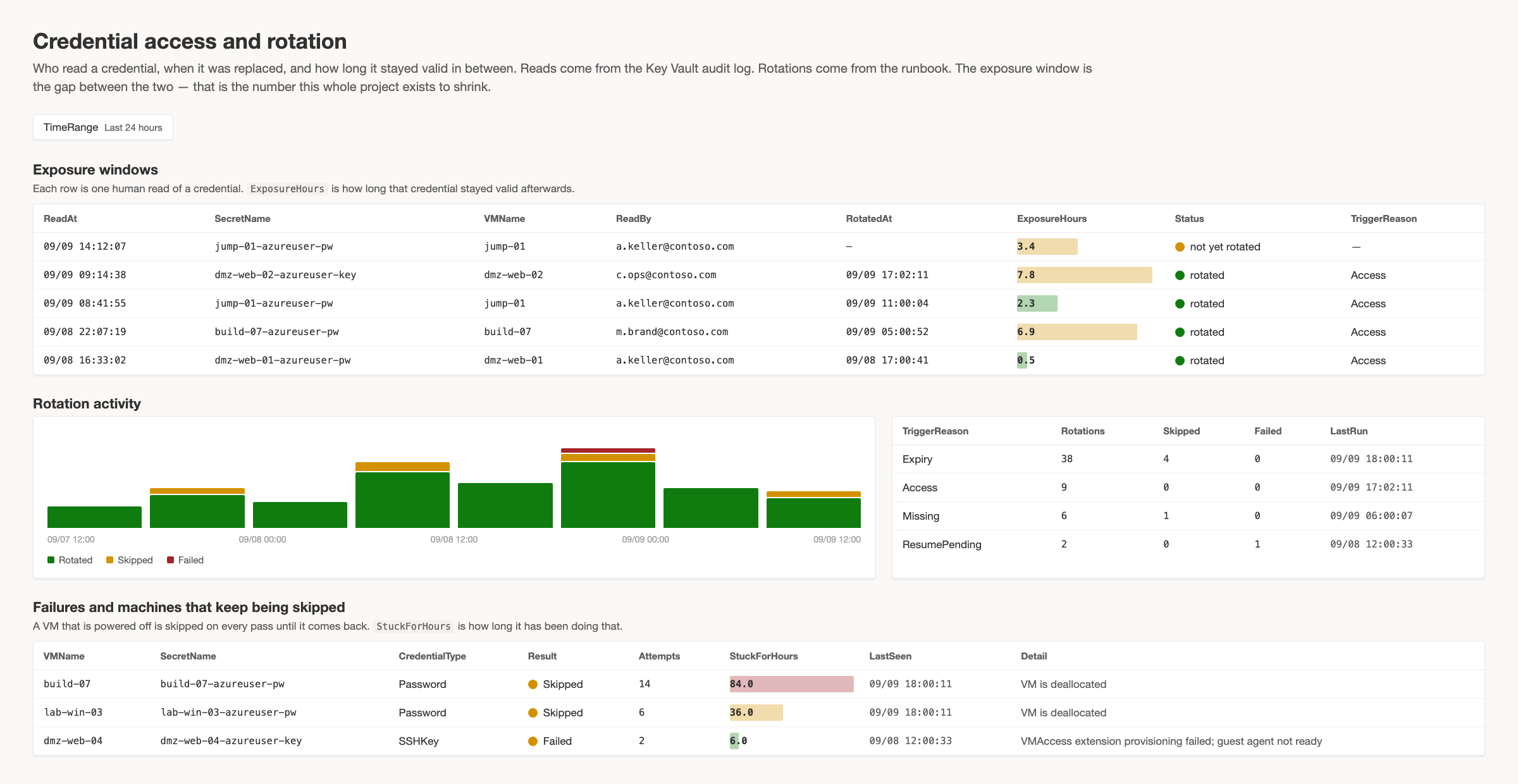
The vault's audit log says who read a secret; reading one moves its expiry forward, so the next pass replaces it.
A failure in between leaves a credential that is in the vault and about to work, not one that works and is nowhere.
The first run over an untagged estate does nothing at all, and dry-run is the default the deployment ships with.
One row per attempt in a custom table: secret versions before and after, who read what, and what keeps being skipped.
Proof
Every row below was executed against live Azure VMs in a lab, both from a workstation and through the deployed runbook. Nothing here is inferred from the code.
| Image | Password | SSH key |
|---|---|---|
Windows Server 2022, Marketplace | Verified | — |
Windows Server 2022, CIS Level 1 | Verified | — |
Windows Server 2022, CIS Level 2 | Verified | — |
Ubuntu 24.04, Marketplace | Verified | Verified |
Ubuntu 24.04, CIS Level 1 | Verified | Verified |
Ubuntu 24.04, CIS STIG | Verified | Verified |
No CIS Level 2 image is published for Ubuntu, so the STIG build stands in for it. STIG enforces a sixty-day maximum password age, so set validityDays below that or the guest and the vault disagree. Both deployment paths were run against a live tenant and rotated real credentials, and a machine in a second subscription was rotated from an automation account in the first. Throughput was measured rather than estimated: about three seconds to reconcile a machine with nothing due, about thirty-five to replace one credential, which is roughly three thousand machines or three hundred credentials inside Azure Automation's three-hour job limit.
FAQ
Yes, and it is the right first move — the same commands as after a breach, with -WhatIf on the front. It tells you what it would replace and changes nothing. The secret is created in the vault if it is not there yet, so this is also how a machine is onboarded by hand. What you do not get without the orchestrator is the loop: no retry for a machine that was powered off, and no replacement after somebody reads a credential.
An Automation Account with a system-assigned identity, an existing Key Vault with RBAC authorisation, and a Log Analytics workspace for the audit trail. Name resource groups rather than letting the role fall back to the whole subscription — Virtual Machine Contributor includes installing extensions, which is code execution as SYSTEM or root on every VM in scope.
The order is designed against it: the new credential is written to the vault before it is applied to the machine, so a failure in between leaves a credential that is in the vault and about to work. There is also a hold tag that stops rotation for one machine without untagging it.
On Windows, no: security policy, audit policy, group membership and the RDP setting were identical before and after a rotation on a CIS Level 2 image. On Linux, VMAccess writes /etc/sudoers.d/waagent granting passwordless sudo on every rotation. Stock images already grant that, so nothing changes — but on a machine where somebody removed it deliberately, it comes back, and there is no switch for it.
Two thousand machines on ninety-day validity come due at around twenty-two a day, so steady state is not the problem. The pass that does not fit is the first one over a large estate, when every credential is missing at once — onboard in batches and let the schedule catch up. The measured figures are above.
Name resource groups by resource ID or whole subscriptions by ID, and the deployment assigns the role where the machines are while telling the runbook which subscriptions to walk. The identity still has to reach them; naming one it cannot see produces a permission error rather than an empty result.
Either, and both have been deployed against a live tenant and rotated real credentials. Bicep is the default and the one the deploy button uses; it imports the module from the PowerShell Gallery. Terraform publishes a flattened runbook and needs no Gallery access.
The hard half is knowing which machines still hold one, who reads them, and what breaks when they change. I run that review as the first step and stay for the deployment.