The tag names the schedule
PowerSchedule=office-hours-ch. The schedule itself lives in the Automation Account, so one edit changes every machine that follows it.

Cloud Engineer · Zürich
Scheduled automation · Bicep
Start and stop Azure VMs at the times you choose, without maintaining a list of which machines. Each VM carries the name of its schedule as a tag, and one hourly runbook works out what should be running. Built as the alternative to Start/Stop VMs v2.
# Office hours are over. What does the schedule want?
Get-VmPowerPlan -Schedule $office | ft Name,Schedule,Action
Name            Schedule         Action
app-test-01     office-hours-ch  Deallocate
build-agent-03  office-hours-ch  None
lab-win-11      (none)           None
Only tagged machines are touched. Nothing was performed.
Quick start
Read-only, against any tenant you can read. No tag has to exist, nothing is deployed and nothing changes. You describe when machines should be up, and look at what that would mean.
Needs Reader on the subscriptions you want to see · Prerequisites
Install-Module AzureVMPowerManagement -AllowPrereleaseConnect-AzAccountA schedule is a name, a time zone and the windows it is up. Check it against a calendar before anything else sees it. Daylight saving shows up in the Note column rather than being smoothed away.
$office = New-VmPowerSchedule -Name office-hours-ch -TimeZone 'Europe/Zurich' -Weekdays '07:30-18:30'
$office | Show-VmPowerScheduleCalendar -Days 14One decision per machine, including the ones no rule touches. Action is what it would do, Reason is the short name for why — all of them are listed here. The preview and the real run share one function, so they cannot disagree.
Get-VmPowerPlan -Schedule $office | Format-Table Name, Schedule, PowerState, Action, ReasonThe alternative
Microsoft's own answer to this is an application you deploy into your own subscription from a GitHub repository: a Function App, a storage account, Application Insights, a Log Analytics workspace and five Logic Apps. It works. These are the places it made me want something else.
| Start/Stop VMs v2 | VM Power Management | |
|---|---|---|
| Which machines are in scope | A list of subscriptions, resource groups or VM resource IDs in a JSON payload. Nothing keeps it current as machines come and go. | A tag on the machine. Membership is recomputed on every run. |
| Changing a schedule | Edit the recurrence and a JSON request body in the Logic App designer, in code view. | One cmdlet. Preview it as a calendar first, then store it. |
| What the identity may do | Contributor, per Microsoft's own multi-subscription instructions. That includes installing extensions, which is code execution on every machine in scope. | A custom role with four actions: read a VM, start it, deallocate it, list resource groups. |
| Before it acts for the first time | Nothing. The first scheduled run is the real one. | It ships disarmed. The first week is a report from the same code path, with every guard evaluated. |
| Guards | An exclusion list and an exclusion tag. | Exclusion tag, blast radius, dwell time and the armed flag. Every refusal is recorded with its reason. |
| What lands in your subscription | Function App, storage account, Application Insights, Log Analytics workspace, five Logic Apps, a dashboard. | An Automation Account, a workspace and a workbook. |
| Maintenance | No further development. Two functions are deprecated, auto-update should be switched off, and new versions are pulled from GitHub by hand. | Active. |
Where v2 wins. It starts and stops tiers in order through the sequencestart and sequencestop tags, it can stop a machine whose CPU stays under a threshold, and it emails you. This does none of those. One more thing to know before v2 lands next to something else: its deployment tags its resource group SolutionName and removes every other tag on those resources.
What it does
PowerSchedule=office-hours-ch. The schedule itself lives in the Automation Account, so one edit changes every machine that follows it.
Membership is recomputed from tags on every run. A machine created at 11:00 is managed at 12:00, one deleted at 13:00 stops mattering at 14:00.
Authored with a cmdlet, previewed as a calendar, stored under a name a policy can enforce. Not a JSON payload in a designer.
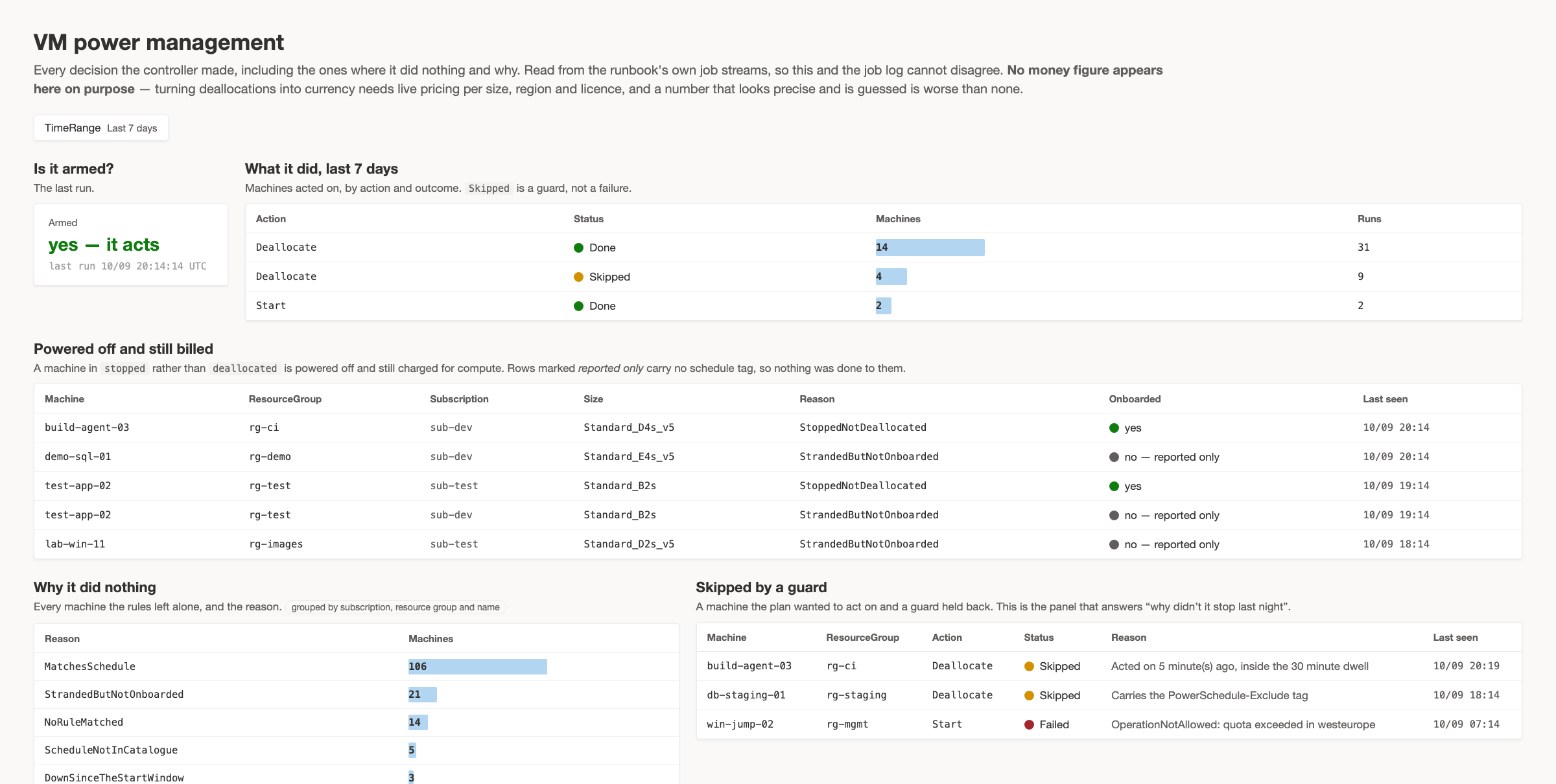
Disarmed means it decides everything and touches nothing, so the first week is a report. Arming it is one variable, not a redeployment.
Armed or not, blast radius, dwell time, exclusion tag. Every refusal is written down with its reason.
Machines shut down from inside the guest sit on a host doing nothing. They need no schedule and no tag to be reported.
Proof
Against live VMs in a lab, through the deployed runbook on a real schedule. Nothing here is inferred from the code.
Still unproved: an estate large enough to page Resource Graph, and a deallocation across two subscriptions in one run. Everything found so far
FAQ
That is the quick start above. Get-VmPowerPlan reads Resource Graph and returns a decision per machine, including the ones no rule touches and why. It needs Reader and nothing else. After deployment the same applies: the controller ships disarmed, so its first week is a report.
If you need machines started in a fixed order across tiers, or stopped when their CPU falls below a threshold, yes — this does neither. Otherwise the table above is the honest comparison. The short version: v2 keeps a list of machines and hands its identity Contributor; this keeps a tag on the machine and hands its identity four actions. Microsoft also states there will be no further development of v2.
Because the half that repeats is not there yet. Microsoft.ComputeSchedule is generally available for one-off batched Start, Deallocate and Hibernate, and it handles throttling and retries properly. The recurring half is autoActions, and on 13 September 2026 that resource type still did not resolve in a normal subscription at any API version, preview or not: the provider lists its operations, a call returns InvalidResourceType. So the controller owns the recurrence, and hands the power operation to Azure.
The Logic App reacts to one event — somebody shut a machine down — and deallocates it within minutes. If the stranded machine is your only problem, take that. This runs hourly instead, and also does the schedules, the guards and the record.
Machines that are off cost no compute, so yes, as a side effect. But this is a scheduling tool and not a cost tool: it tells you what it did, per machine, with the reason, and puts no currency figure on it. Pricing per size, region and licence model is not something to guess at, and a number that looks precise and is invented is worse than none.
Switching a machine off is one command. Which machines may be, who notices when they are, and what the schedule says on a holiday is the conversation. I run that as the first step and stay for the deployment.