Every credential
Secrets, certificates and federated credentials per app, each with the state of its expiry against your warning window.

Cloud Engineer · Zürich
Read-only audit · HTML report
Find expiring credentials, inactive apps and abandoned registrations in your Entra tenant. One file, read-only, one HTML report you can filter and hand over.
iwr https://raw.githubusercontent.com/simon-vedder/app-lifecycle-analyzer/main/AppLifecycleAnalyzer.ps1 -OutFile AppLifecycleAnalyzer.ps1# One file. Read it first if you like. iwr https://raw.githubusercontent.com/simon-vedder/app-lifecycle-analyzer/main/AppLifecycleAnalyzer.ps1 -OutFile AppLifecycleAnalyzer.ps1 # Sign in with read scopes only, read, write the report. ./AppLifecycleAnalyzer.ps1 Found 214 app registrations 12 of 214 apps are deactivated (isDisabled = true) Total apps with sign-in info: 168 Expired creds: 23 Inactive (>90 d): 41 Report written: ./AppLifecycleAnalysis_20260908-091412.html
Quick start
From a workstation with PowerShell 7. Three delegated read scopes on Graph are all it needs. It reads your tenant and writes one HTML file, and changes nothing.
Needs three Graph read scopes, and Entra ID P1 for the activity data · Prerequisites
One file. Read it first if you like.
iwr 'https://raw.githubusercontent.com/simon-vedder/app-lifecycle-analyzer/main/AppLifecycleAnalyzer.ps1' -OutFile 'AppLifecycleAnalyzer.ps1'It signs you in read-only, reads every registration, and writes the report next to itself. It needs Microsoft.Graph.Authentication and Microsoft.Graph.Applications, and offers to install them.
./AppLifecycleAnalyzer.ps1The defaults are 90 days without a sign-in and 30 days to expiry. Both are yours to tighten.
./AppLifecycleAnalyzer.ps1 -InactiveDays 60 -ExpiryWarningDays 14For a report you hand to somebody, in a tenant that is not your default.
./AppLifecycleAnalyzer.ps1 -TenantId 'contoso.onmicrosoft.com' -OutputPath './apps-q3.html'What it does
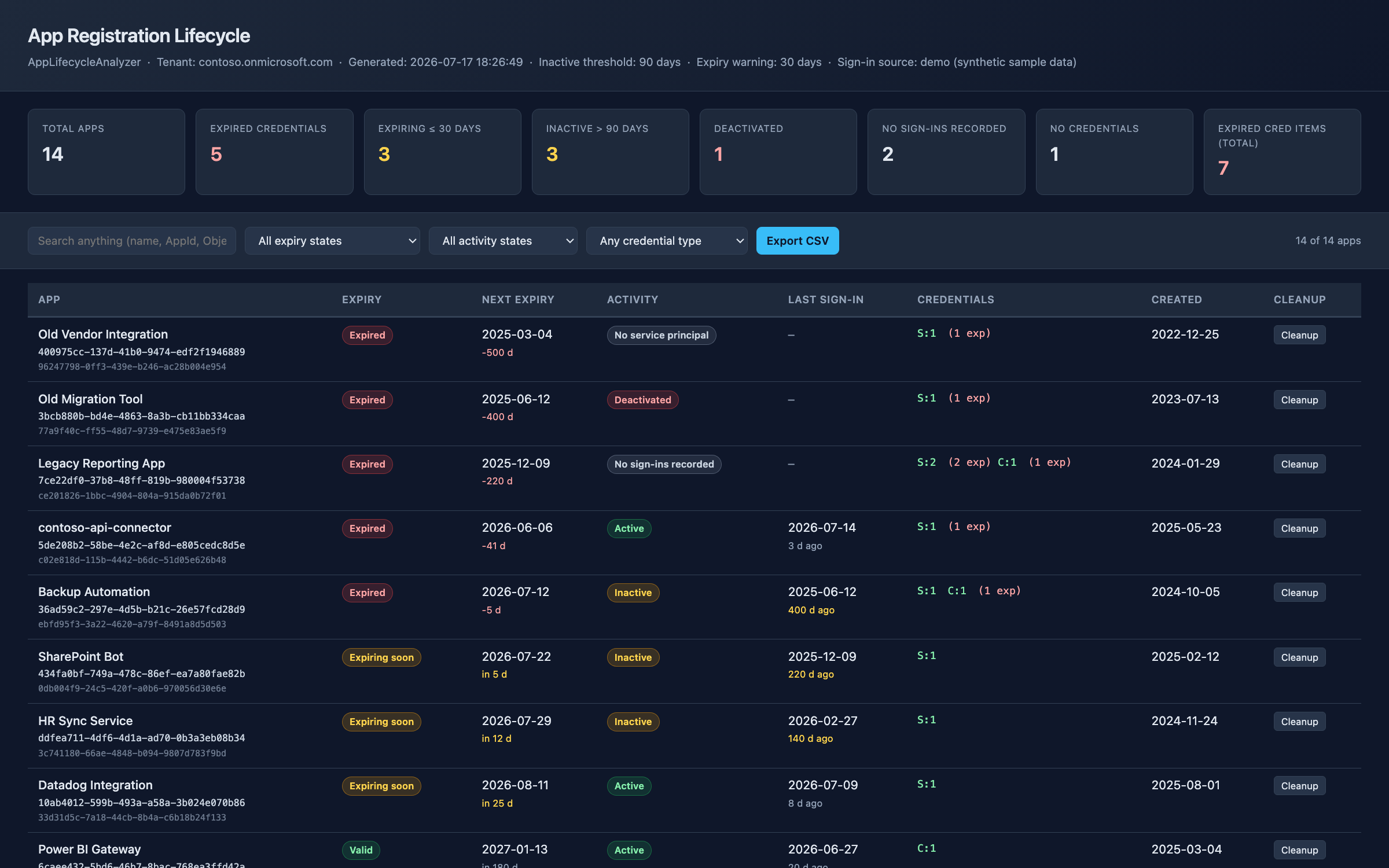
Secrets, certificates and federated credentials per app, each with the state of its expiry against your warning window.
The report endpoint and the recent sign-in logs, laid over each other, because neither is complete on its own.
A registration nobody ever consented to is named as that, not left as a blank row.
No recorded sign-in, no credential, and the deactivated flag are three different states.
One HTML file with tiles and filters, and a CSV export of whatever you filtered to.
Remove-MgApplicationPassword with the keyId filled in, per credential or in bulk. The script never runs it.
Under the hood
One pass over the tenant, four Graph reads, one file out. Everything the report shows is in the file it writes — no external resources, no call home.
Three delegated read scopes on Graph, consented at sign-in, read-only unless you ask for more with -RequestWriteScopes. It reads every app registration with its secrets, certificates and federated credentials; every service principal; the deactivated flag; and sign-in activity from the report endpoint with the recent sign-in logs merged over it, because neither source is complete on its own.
Each credential gets an expiry state against your warning window, each app an activity state against your inactivity window. Apps with no service principal, no credential or no recorded sign-in are called that, not left blank.
One HTML file with tiles, filters, sortable columns and a CSV export of whatever you filtered to. Each row carries the command that would clean it up; a detail view shows every credential with its own.
Proof
FAQ
Yes, by default. It asks for Application.Read.All, Directory.Read.All and AuditLog.Read.All, reads, and writes an HTML file. The cleanup commands in the report are text you copy. If you want to run them from the same session you have to pass -RequestWriteScopes, which adds Application.ReadWrite.All to the consent — a deliberate, visible opt-in.
Only for sign-in activity, which comes from the audit logs. Without a licence the report still lists every app, every credential and every expiry date; the activity column says there is no sign-in data rather than guessing that the app is dormant.
Three things only exist there today — the deactivated flag on an application, the service principal sign-in activity report, and the recent sign-in logs. That is a real dependency on a surface Microsoft can change; if a call fails the script warns and carries on with what it has instead of stopping.
Out of scope. They have no secrets to expire and a different cleanup path, so mixing them into this report would make it longer without making it more useful. This covers app registrations and the service principals behind them.
A handful of paged Graph calls for the whole tenant, not one per app. A few hundred registrations is a couple of minutes, and most of that is waiting on the sign-in report.
A browser. It is one HTML file with the data, the filters and the styling inside it — no CDN, no fonts to fetch, nothing that stops working when you mail it to someone.
Cleaning up app registrations is mostly a conversation, not a script — who owned this, what breaks if it goes, who renews the one that stays. I run this audit as the opening step of that conversation and stay for the rest of it.