Nested groups expanded
A person who is Owner through two groups appears as a person, not as a group. Cycles included.

Cloud Engineer · Zürich
Read-only audit · HTML report
See who holds privileged access across Azure and Entra ID, including the assignments hidden behind nested groups, custom roles and dormant apps. One file, read-only, one HTML report.
iwr https://raw.githubusercontent.com/simon-vedder/risky-roles-analyzer/main/dist/Invoke-RiskyRolesAudit.ps1 -OutFile Invoke-RiskyRolesAudit.ps1# One file. Read it first if you like. iwr https://raw.githubusercontent.com/simon-vedder/risky-roles-analyzer/main/dist/Invoke-RiskyRolesAudit.ps1 -OutFile Invoke-RiskyRolesAudit.ps1 # Sign in with read scopes only, read, write the report. ./Invoke-RiskyRolesAudit.ps1 Critical 9.0 Entra Global Administrator Legacy Deploy App NoValidCredential High 8.5 Azure Owner (MG) Bob Leaver via Cloud Admins Disabled Low 3.9 Entra Directory Readers Anna Keller Disabled 14 finding(s) in 41 s Report: ./RiskyRolesAnalyzer-report-20260907-131244.html
Quick start
From a workstation with PowerShell 7.2. The script reads Graph and Azure and writes one HTML file. It changes nothing in your tenant, and there is no write path in it at all.
Needs four Graph read scopes and Reader on the subscriptions · Prerequisites
One file, roughly 2,400 lines, and it is all there. Read it first if you like.
iwr 'https://raw.githubusercontent.com/simon-vedder/risky-roles-analyzer/main/dist/Invoke-RiskyRolesAudit.ps1' -OutFile 'Invoke-RiskyRolesAudit.ps1'It signs you in with read scopes, collects, scores, and writes the report next to itself.
./Invoke-RiskyRolesAudit.ps1Named accounts are marked Protected instead of being listed as work to do.
./Invoke-RiskyRolesAudit.ps1 -BreakGlassAccount 'breakglass@contoso.com'-SkipAzure for an Entra-only tenant, -SkipPim where there is no Entra ID P2.
./Invoke-RiskyRolesAudit.ps1 -SkipAzure -SkipPimWhat it does
A person who is Owner through two groups appears as a person, not as a group. Cycles included.
A custom role is judged by the actions it grants, not by its name. Risky actions come from a data file you can read.
An app registration whose last credential expired still holds Global Administrator. So does a disabled user.
Eligible, activated and permanent are three different things, and the score treats them that way.
Base per role, multiplied by scope breadth, adjusted for PIM, principal type and sign-in ability. Every input is visible.
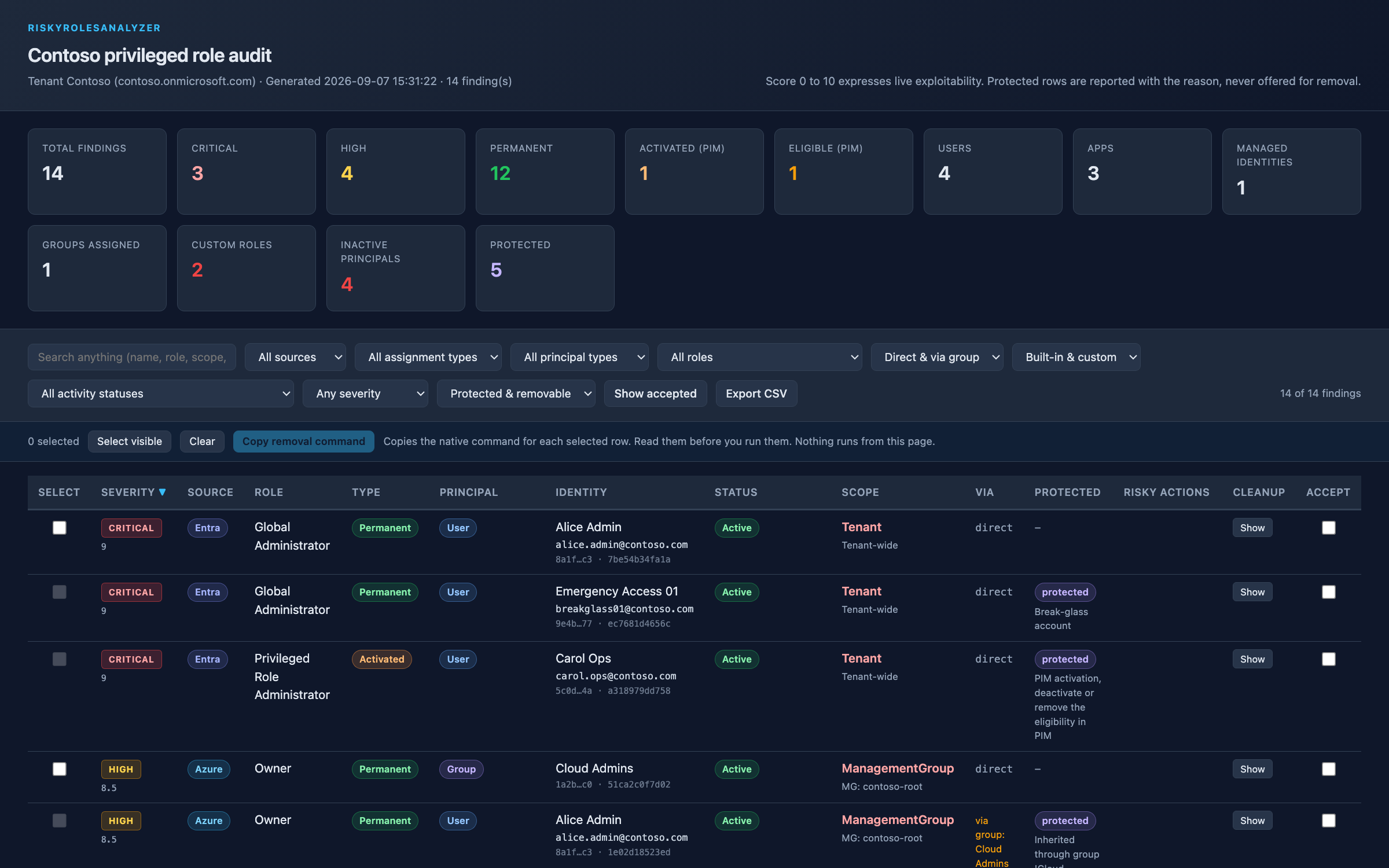
Each finding carries the command that would remove it. What must not be touched says so instead, with the reason.
Under the hood
Collectors talk to Graph and Az. Rules are pure functions with a test on a fixture. The catalog of roles, risky actions and weights is one data file you can read.
Four read scopes on Graph, Reader on Azure, and no write path in the script at all. It reads app registrations with their credential state, custom role definitions with their actions, every assignment at subscription scope (inherited ones once), permanent and eligible directory roles, and PIM activations from the schedules.
Each principal once — user, group, managed identity, app registration or enterprise app — with whether it can sign in at all. Groups are walked to their members, cycles included.
A base per role, multiplied by scope breadth, lowered for PIM eligibility and for principals that cannot sign in, raised a little for applications. Critical from 9, High from 7, Medium from 5.
Inherited through a group, PIM eligible or activated, your break-glass accounts and the identity running the audit are marked Protected. Reported, never removed.
Proof
FAQ
Yes. There is no write path in the script at all. It asks for RoleManagement.Read.Directory, Directory.Read.All, Group.Read.All and Application.Read.All on Graph, and Reader on Azure. The report hands you commands; running them is a separate, deliberate act.
The built-in roles from the catalog (Owner, User Access Administrator, Global Administrator, Privileged Role Administrator and the usual list, plus the roles BloodHound treats as dangerous), custom roles that grant a risky action, and anything you add with -AdditionalAzureRole or -AdditionalEntraRole.
A base per role (critical, high, medium, custom-with-risky-actions), multiplied by scope breadth (root and tenant 1.0, management group 0.95, subscription 0.85, resource group 0.65, resource 0.45), minus 1.5 for PIM eligible, plus 0.5 for applications and managed identities, minus 2.0 for disabled principals. Critical from 9, High from 7, Medium from 5, Low from 3.
Assignments inherited through a group (the fix is the group's assignment or the membership, both yours), PIM eligibility and activations (manage them in PIM), the accounts you name with -BreakGlassAccount, and the identity running the audit. They show as Protected with the reason.
Only for the PIM parts. Without P2 the eligible and activated queries fail, the audit warns once and continues with permanent assignments; -SkipPim silences the warning.
I run this as the first step of an identity review — the findings walked through with the people who own them, the break-glass and PIM design checked, the cleanup done together.