
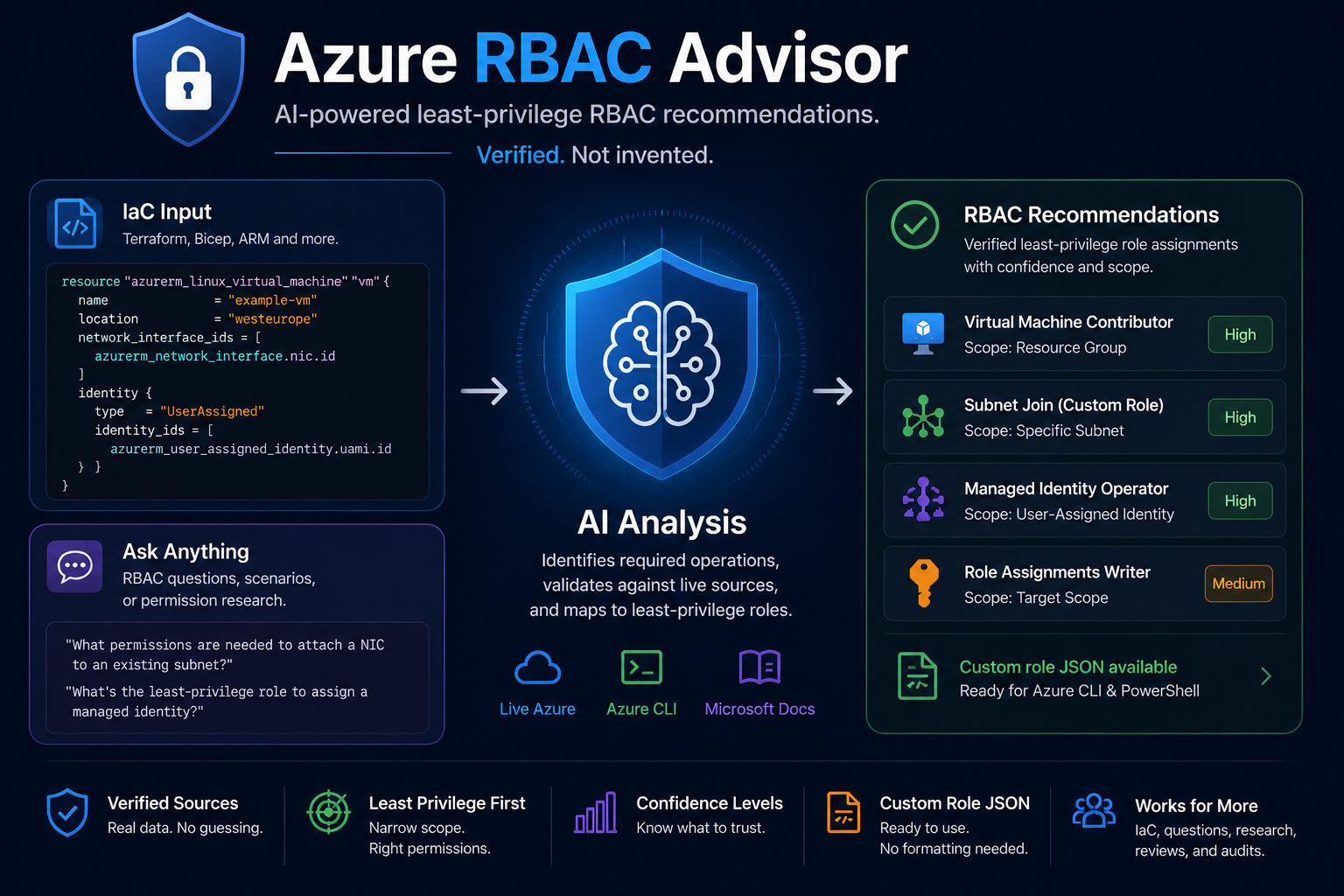
azure-rbac-advisor — a prompt skill that researches least-privilege RBAC for your IaC and doesn’t make up permission strings.*
How this started
This didn’t start with an agent idea. It started with a website.
A couple of weeks ago I built Least Privilege Studio — a tool where you pick Azure permission actions and it tells you which built-in role covers them at the narrowest scope. It also generates a custom role definition if nothing built-in fits cleanly.
The premise was simple: Azure has over 500 built-in roles, the documentation is a wall of text, and most engineers either give up and assign Contributor or spend an afternoon cross-referencing tables. The site makes that comparison fast.
After that shipped, the natural next question was: what about the roles that are already assigned — particularly the dangerous ones?
So I wrote a PowerShell script that scans an entire tenant across all subscriptions and surfaces high-privileged role assignments that most teams aren’t watching closely. Not just the obvious ones like Owner and User Access Administrator, but also single-permission combinations that enable privilege escalation and attack paths that don’t show up in Defender for Cloud at all.
I wrote about that here: The privileged role exposures Defender misses
By this point I’d spent a lot of time thinking about the gap between what Azure RBAC should look like and what it actually looks like in most tenants.
The website helps you figure out what to assign.
The script helps you audit what’s already there.
The missing piece was the middle: when you’re writing IaC and you need to know exactly what permissions a service principal needs to deploy it — not Contributor, not a guess, the actual operation strings at the correct scopes.
That’s where the agent idea came from. So I built a skill for it.
It’s called azure-rbac-advisor, and it lives in my skills repository.
The core idea: enforce a real verification chain before any permission string makes it into the answer.
What the AI gives you without this
Before explaining what the skill does, it’s worth being specific about the problem it solves.
Drop a Terraform file into a raw Claude or Copilot session and ask “what RBAC role does this service principal need?” — you’ll get an answer. It will look confident. It will probably include real-looking permission strings.
Some of them will be wrong.
The model will hallucinate Microsoft.Compute/virtualMachines/deploy/action when the real operation is Microsoft.Compute/virtualMachines/write. It will suggest Contributor because that’s the safe default when the model is uncertain. It will miss scopes — the role assignment that needs to land on the subnet, not the resource group.
The hallucination problem with RBAC is particularly bad because wrong permission strings don’t produce obvious errors until something fails at runtime, and Contributor is the kind of wrong answer that works — it just over-privileges your deployment identity by two levels.
A structured skill doesn’t fix the underlying model. It changes how the model reasons. Force a verification step before any permission string makes it into output, and the failure mode shifts from “confident wrong answer” to “honest gap.”
What the skill actually does
azure-rbac-advisor is a prompt skill — a structured set of instructions you load into Claude, Codex, or GitHub Copilot CLI.
When you ask it an RBAC question or hand it an IaC file, it follows a defined workflow rather than free-associating from training data.
- Clarify scope only when it materially changes the answer. Drop a Terraform file in and it reads it and states assumptions rather than interrogating you for five minutes.
- Identify every Azure operation the code implies. Not just the obvious resource writes — also data sources, existing resource references, nested resources, private endpoints, role assignments, and diagnostic settings.
- Separate by target scope. Deployment scope, resource creation scope, and linked-resource scope are different authorization targets and often land on different principals.
- Map to built-in roles ranked by least privilege. Service-specific roles over
Contributor. Narrower scopes over subscription-wide assignments. - Handle Bicep intelligently. The skill runs
bicep buildwhen available and inspects the generated ARM JSON. - Inspect ARM templates directly. Nested and extension resources are treated as separate authorization targets with their own required operations.
- Emit custom role JSON on request. Output is formatted for Azure CLI and PowerShell — not a made-up schema.
The output also includes three explicit sections:
- Assumptions — what the skill inferred from your code
- Verification — which sources were consulted
- Gaps — operations it couldn’t fully verify
That last point matters. Most tools give you an answer. This one tells you how much to trust it.
The verification hierarchy
The skill prioritizes sources in this order:
- Azure MCP tools — if your agent has Azure MCP configured, it queries provider operations and role definitions directly from your tenant.
- Azure CLI —
az provider operation listandaz role definition list, pointed at your actual subscription. - Microsoft Learn — authoritative fallback for stable operations and built-in roles.
The instruction baked into the skill is explicit:
Do not invent permission strings. If you cannot verify an operation through one of the above sources, say so.
If the skill can’t confirm something, it reports a gap instead of filling it with a guess.
Setting up Azure MCP
Without Azure MCP, the skill falls back to Azure CLI or Microsoft Learn docs. Both work — but neither gives you live tenant data. Azure MCP connects your agent directly to your subscription so it can query actual role definitions and provider operations rather than relying on what the docs say is there.
Setup is one config block and an az login.
Claude
Add to ~/.claude/settings.json (user-wide) or .claude/settings.json (project-local):
{
  "mcpServers": {
    "azure": {
      "command": "npx",
      "args": ["-y", "@azure/mcp@latest", "server", "start"]
    }
  }
}
To scope to a specific subscription:
"args": ["-y", "@azure/mcp@latest", "server", "start", "--subscription", "<subscription-id>"]
VS Code / GitHub Copilot
Add to .vscode/mcp.json in your repo or workspace:
{
  "servers": {
    "azure": {
      "type": "stdio",
      "command": "npx",
      "args": ["-y", "@azure/mcp@latest", "server", "start"]
    }
  }
}
Authentication
Azure MCP inherits your Azure CLI session:
az login
az account set --subscription <subscription-id>
Restart your agent after adding the config. The skill automatically prefers live tenant queries over documentation fallbacks.
Concrete example: Golden Image Builder
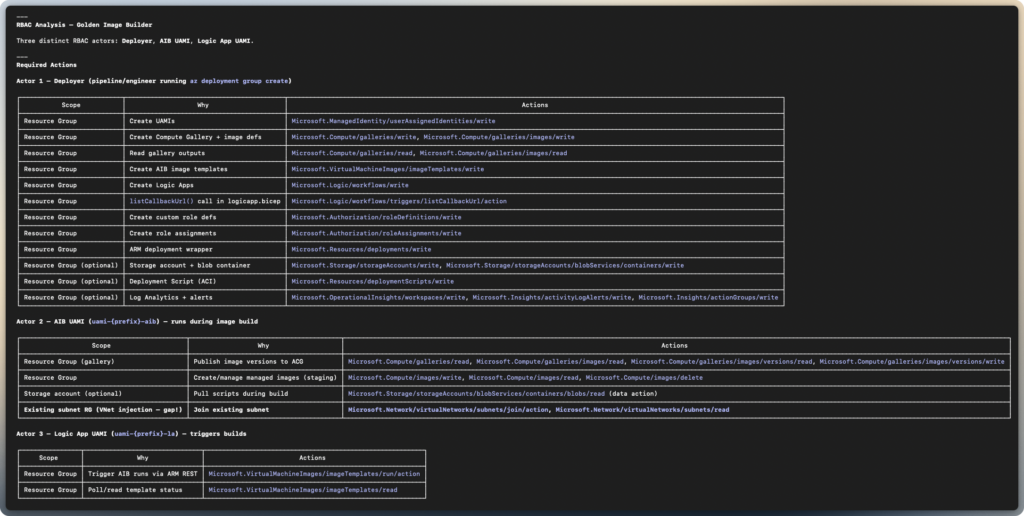
I ran it against the Bicep solution I wrote for automating Azure golden image builds. That solution deploys several identities with different permission requirements: a deployment principal, a user-assigned managed identity for Azure Image Builder, and a UAMI for the Logic App.
Three principals. Three different permission sets. The kind of RBAC model that normally takes twenty minutes of documentation cross-referencing to get right.
Required operations by scope
Recommended built-in role split
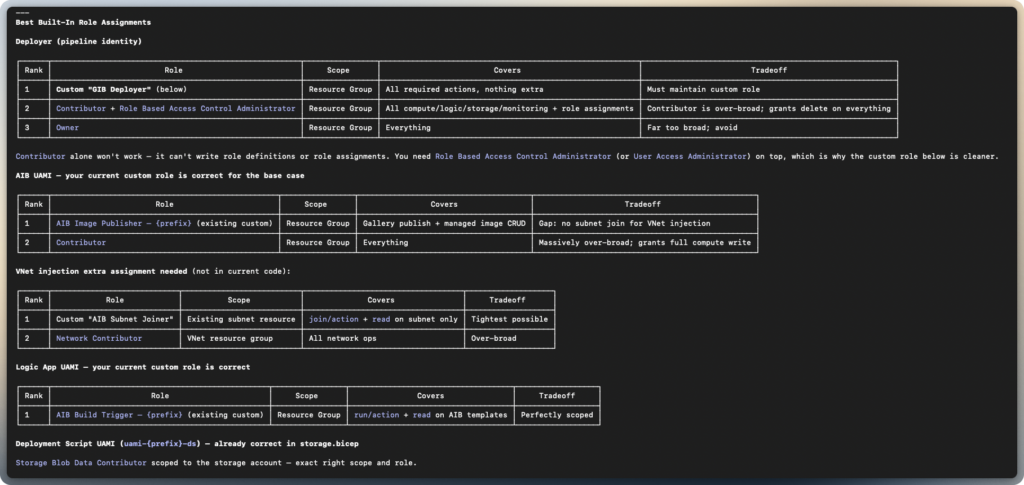
For stricter least privilege, the skill recommends a custom role.
Example:
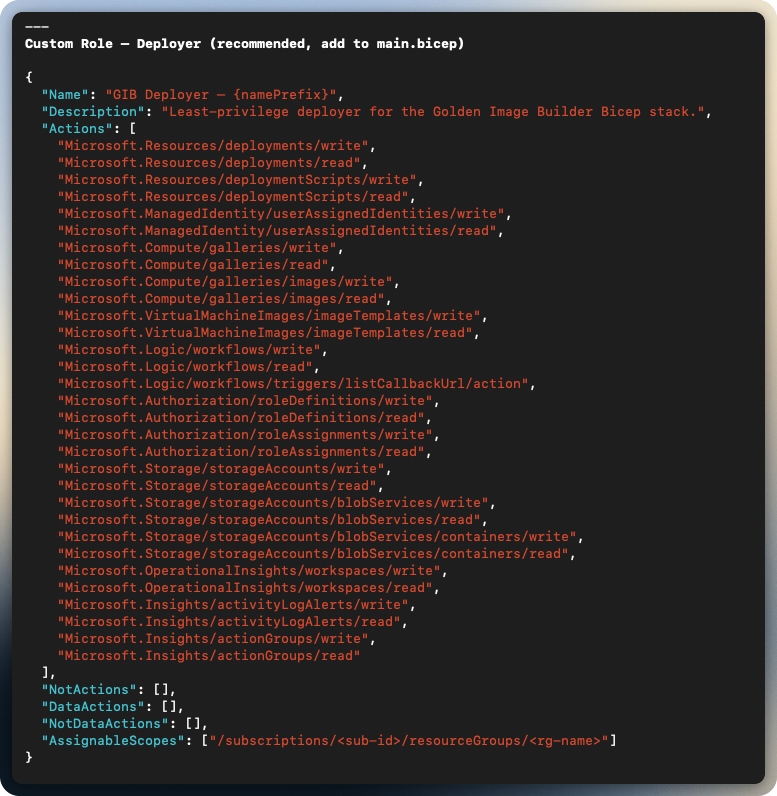
One prompt. That output would have taken a documentation sprint to produce manually.
Applying assignments
Once the skill produces its output, you don’t have to manually translate it into CLI commands.
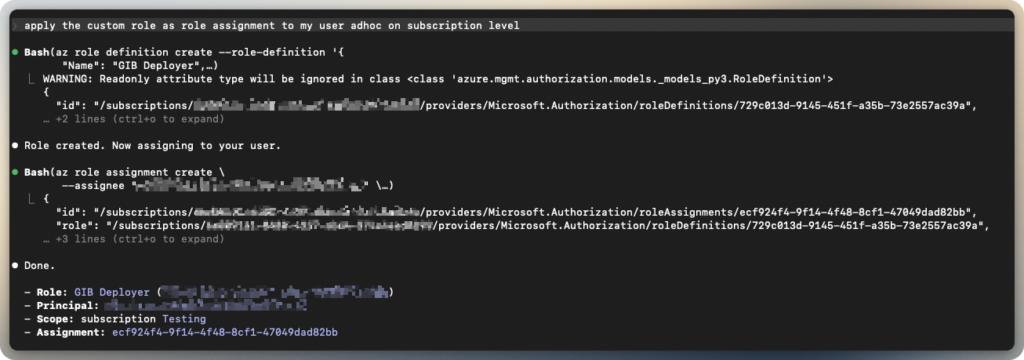
Say “apply” and provide a principal — UPN or object ID — and the skill switches into apply mode. It shows a full manifest of every change before touching anything:
[Custom Role]  "VM Deployer - Subnet Join"       AssignableScopes: /subscriptions/...
[Assignment]   "Virtual Machine Contributor"      Scope: .../resourceGroups/myRG  →  john@contoso.com
[Assignment]   "VM Deployer - Subnet Join"        Scope: .../subnets/mySubnet     →  john@contoso.com
[Assignment]   "Managed Identity Operator"        Scope: .../identities/myId      →  john@contoso.com

Confirm? (yes / no)One confirmation. It creates the custom role definition first, then all assignments. Failures report per row without aborting the batch.
You need User Access Administrator or Owner at the target scope, and Azure CLI signed in. Everything else the skill handles.

Where it runs
The skill works on Claude, Codex, and GitHub Copilot CLI.
Claude — copy the skill directory into ~/.claude/skills/. Claude detects it automatically.
Codex — copy into ~/.codex/skills/.
GitHub Copilot CLI — two options: repository-local under .github/skills/.
Remember: For tenant-aware verification, authenticate with Azure CLI first. Without it, the skill works entirely from local IaC files and public documentation.
What it doesn’t do
- Doesn’t parse HCL natively. It reads Terraform resources heuristically — good enough for most cases, not a formal parser.
- Doesn’t validate existing assignments. It recommends required permissions. It doesn’t audit what’s already in your tenant. Use the PowerShell script above for that.
- Doesn’t account for locks or deny assignments. RBAC allow and Azure Policy deny are separate systems.
- Doesn’t fully cover every provider. Common providers work well. Niche or preview providers will produce lower-confidence output.
- Doesn’t replace an IAM review. It’s a research accelerator — not an auditor.
Use it to generate the first draft of your RBAC model. Review before production use.
Where to get it
github/simon-vedder/skills/azure-rbac-advisor
Copy the directory into your platform’s skills folder, restart your agent, and start using it.
No pipeline. No installer. Just copy the folder and go.
Leave a Reply