
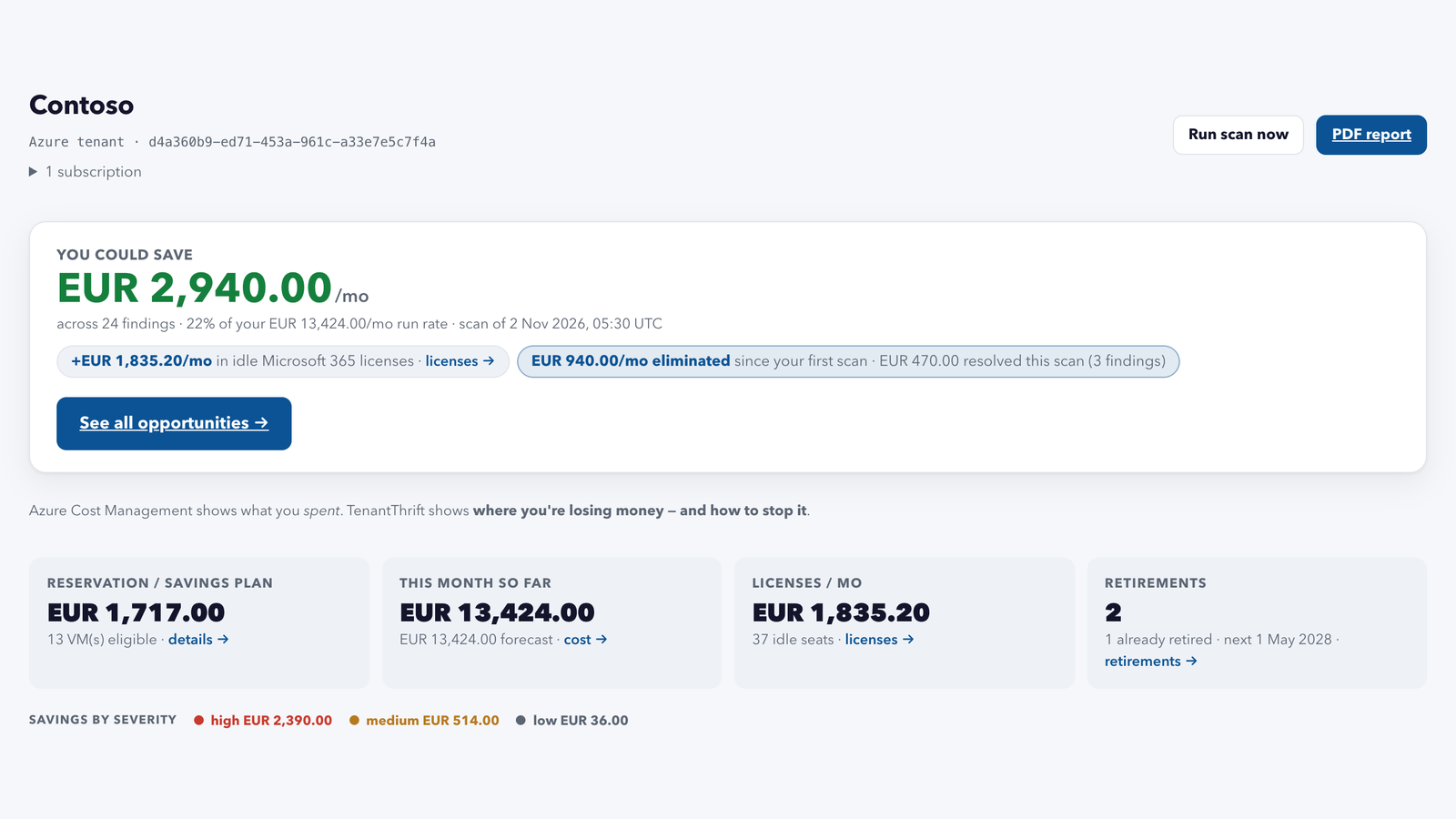
TenantThrift is live: a hosted Azure cost scanner that finds what you pay for and do not use, prices it from your own bill, and hands you the command to fix it. I have been building it since May, and the one rule that never changed: it cannot do anything except read. This post is about where it came from, what it finds, and how the trust part works.
What TenantThrift does, in short
TenantThrift connects to your Azure tenant with read-only access and scans it on a schedule. Every scan gives you:
- Findings: money you can save. Each finding is something you pay for and do not need in its current form: a VM that runs around the clock for daytime work, a database sized far above its load, a disk or public IP nobody uses anymore. Each one comes with the monthly saving, priced from your own bill, and a command for every fix option.
- A cost overview. Spend by resource type, resource group, subscription and tag, with the trend of the last six months.
- A commitment planner. Which VMs run enough for a reservation or a savings plan, and the shopping list once you have decided.
- Retirements. Azure retirements that hit a resource you run, with the date.
- Microsoft 365 licenses, optional. Seats you pay for and nobody uses, as counts, never names.
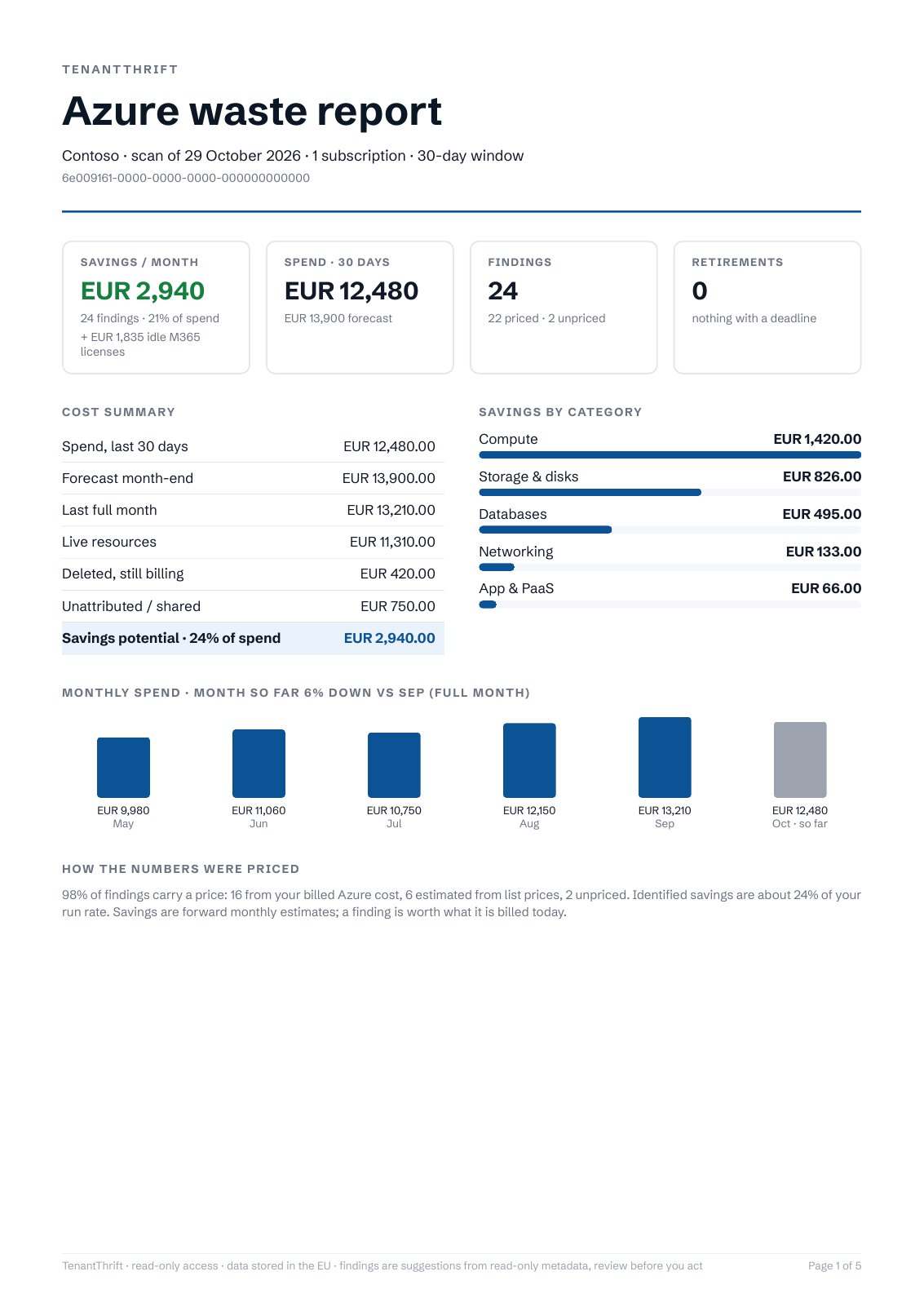
- Reports and alerts. A PDF after every scan for whoever owns the budget, and an alert when new waste shows up or spend jumps.
- For MSPs. All client tenants under one login, with a white-label report per client.
It only ever reads: the Reader role, nothing deployed in your tenant, and no command runs unless you run it. The rest of this post is how it got here, how the trust part works, and what each of these looks like in practice.
Fixing one resource was never the hard part
Every Azure environment I have worked in had the same kind of waste. Disks nobody attached again after the VM was rebuilt. Public IPs with nothing behind them.
VMs that ran 24 hours a day for work that happened between nine and five. None of this is special, and all of it is invisible on the bill, because the bill shows what you spent, not what you did not need.
The idea is older than the product. Saving Azure money has been part of my work since 2021, when I ran an Azure Virtual Desktop environment and built the first power automations for it. Some of them still run today.
The Activity Log deallocation and the tag-driven power schedules I wrote about last year came out of the same work. All of them fix one resource at a time, once you know which one. The missing piece was everything before the fix: finding every one of them across all subscriptions, pricing each from the bill, telling you what to do about it, and doing it again tomorrow without anyone remembering to run it.
In May I started building that as a product. The first version was the kind a security person builds: self-hosted, with a Deploy-to-Azure button that put a Function App and a managed identity into your own subscription, so nothing about your infrastructure ever reached me.
It also needed Owner on the subscription, half an hour, and every update was your job. Few people ever saw it, and that was my fault, not theirs. Nobody runs half an hour of setup to find out whether a tool is worth it.
So in July I started over as a hosted service. Since then it has been through a security review and a pricing model I rewrote twice, and today TenantThrift connects to a tenant with admin consent and one role assignment, in about three minutes, with nothing deployed on your side.
That brought up the question I had been avoiding. If my service reads other people’s Azure for a living, what is the worst thing it can do to them? And what is the worst thing someone who breaks into my service can do? The answer had to be “read”, both times. And it had to be true because of how the thing is built, not because of a policy.
Azure is not blind to any of this. Cost Management shows spend by resource and by tag, Advisor lists VMs with low usage and disks that are not attached, and both are free.
What they leave out is the part an admin needs in a meeting: a monthly euro figure from your own invoice next to each item, the number of hours a machine was switched off, a report on a schedule, and the command to run.
Every number names its source
A finding is only useful if the admin can explain its number to whoever owns the budget. So the scanner measures before it prices. VM usage comes from the Activity Log and the CPU metrics of the last 30 days, not from the power state at scan time. Unused disks, public IPs, network interfaces and the rest come from precise Resource Graph checks, with one definition per resource type.
The euro figure comes from Cost Management first, the actual and amortized cost per resource, so a resource that already sits under a reservation is not sold to you as a saving. The retail price is only the fallback, and every finding says which source it used. How that works in detail, including a Cost Management rate limit of about one query every 45 seconds, gets its own post next week.
Read-only is the architecture, not a setting
What a tenant grants
Connecting a tenant means admin consent for a multi-tenant Entra application plus one role assignment. The application asks for exactly one permission, Microsoft Graph User.Read, delegated, and only because the adminconsent endpoint refuses an application with zero permissions (AADSTS1003031).
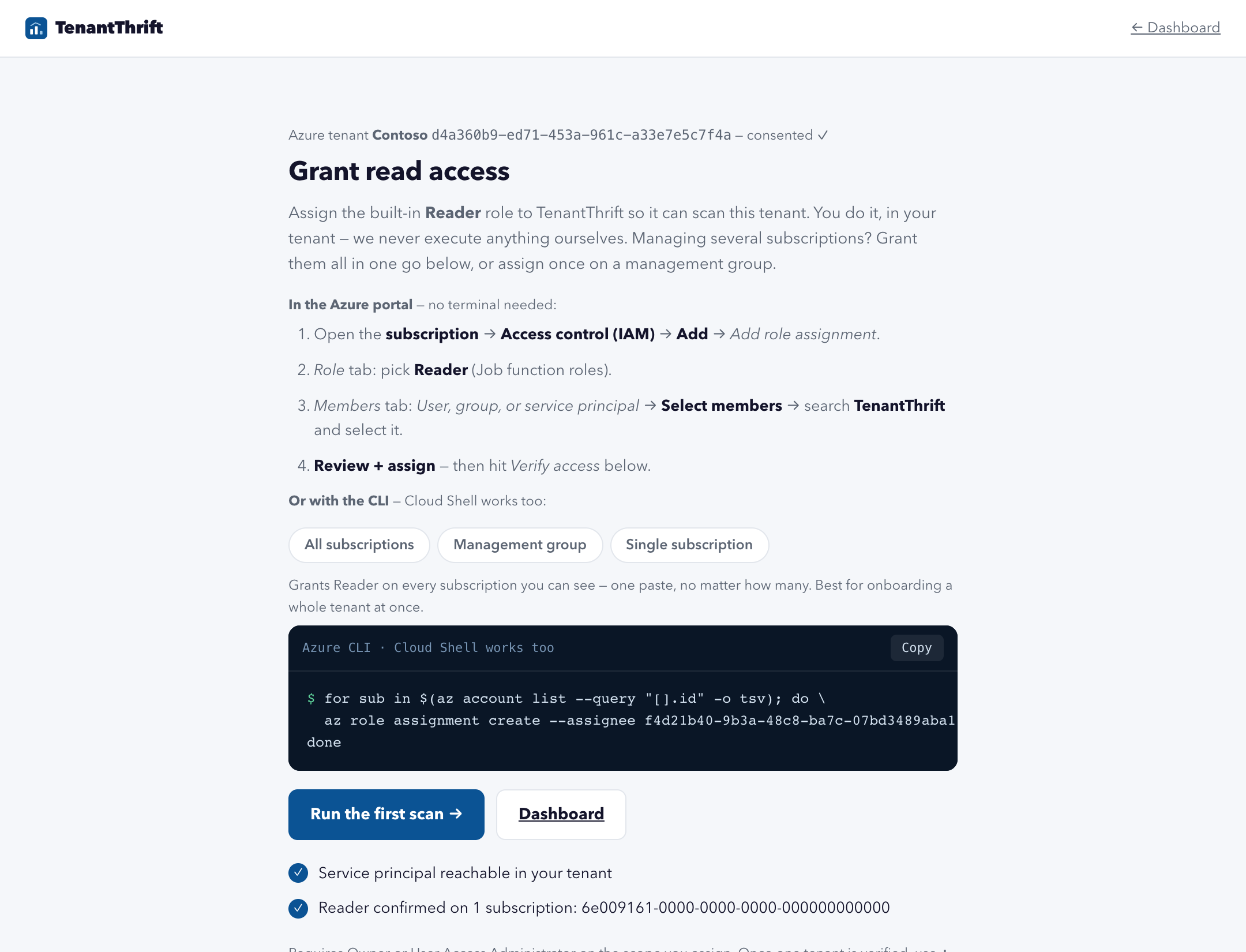
No application permissions, no directory read, and no secret is created on the customer’s side. The scan runs on the built-in Reader role, and the customer assigns it, not me. Put it on a management group and every subscription below it is covered, new ones included. Put it on single subscriptions and the scan sees only those. Either way it is an ordinary role assignment under Access control (IAM), and it comes off the same way.
After that, verification lists the subscriptions the identity can see, and then reads the role assignments of its own principal. Anything beyond Reader is shown to the customer as too much.
If an admin hands out Contributor by habit, the product points at it instead of quietly using it. I built a whole tool around picking least-privilege roles for service principals. For a cost scanner the answer is one word, and the job is to keep it that way.
Proving the person who consented is an admin of that tenant
The consent redirect comes back with tenant=<guid>&admin_consent=True. These are query parameters, a hint and not a proof: anyone can build a URL with someone else’s tenant ID in it. The first security review flagged exactly this.
The callback now does a second OpenID sign-in against the named tenant and checks the id_token: nonce, audience, expiry, issuer, and tid equal to the tenant from the redirect. A guest account, where idp differs from the issuer, cannot speak for a tenant, and wids has to contain one of four admin roles, Global Administrator among them.
That guest rule has a side effect I kept. A GDAP partner signs into a client tenant as a guest, so an MSP cannot consent for a client from its own identity. Instead the product creates a single-use connect link for the client’s administrator, who consents in their own browser with their own account. The connection lands in the MSP’s organization, and the proof still has to pass completely.
What happens if TenantThrift itself is breached
Most cost tools do not answer this question on their website. It is the one I would ask.
The identity that reads customer tenants signs in with a certificate. Its private key is created inside Azure Key Vault and marked as non-exportable: it never reaches the worker, a disk, or me. Every token request is signed by Key Vault, the worker never sees the key, and there is no client secret, not even as a fallback.
The honest limit is still this: an attacker who takes over my worker can read every connected tenant for about an hour at a time. I cannot make that zero while the service exists. What I can do is make it read-only by construction and easy to revoke. Delete the enterprise app or remove the Reader assignment, and the next scan fails on their side, not mine.
Stored data follows the same thinking. Each organization has its own AES-256-GCM data key, wrapped by an RSA key in Key Vault, and resource names, fix guidance, cost breakdowns, tenant names and report recipients are encrypted with it.
A copy of the database without Key Vault is unreadable for all of that. Database and web run in Frankfurt, scans and reports in West Europe. The security page on the site goes one level deeper.
Priced by the bill, and it goes down with it
The price has one axis: the amortized Azure spend of the connected subscriptions in the previous month, Azure services only, converted at the ECB reference rate. Under 5,000 euros of monthly spend the price is 29 euros, for one subscription or for six.
Four self-serve tiers go up to 599 euros at 250,000 of spend; above that we talk. A tier changes only after two months in a row in the new range, announced by email 30 days before it applies, and it goes down by itself when spend falls.
That last part is the point. If the findings work, the bill shrinks and so does my invoice. MSPs pay a base fee plus a small amount per client tenant, by that tenant’s spend, with every new client tenant free for 30 days.
Early access is 45 percent off all of that for 24 months, for the first 50 organizations. Early access in the honest sense: the product runs end to end on real tenants, you will meet rough edges, and the rate is my thanks for telling me about them.
What you get after the first scan
Findings, each with a title, a severity, the resource, and a monthly figure with its source: Cost Management, the retail price, or an estimate. Open one and the fix is a short list of options with a command for each.
For a disk that is not attached: “snapshot, then delete” as the recommended way, “delete now”, and “keep it, but on Standard HDD”. A finding can be ignored with a reason, in the portal or with a ttf-ignore tag. The product never runs any of these commands. It shows them.
Scans run daily, weekly or monthly. Alerts go out when new waste appears or spend jumps. Every scan produces a PDF report, the thing you forward to the person who owns the budget. A cost explorer breaks the same billing data down by subscription, resource group and tag, so “why did it grow” has an answer before anyone opens the report.
Commitments. Reservations and savings plans only pay off on VMs that run enough. The planner compares both, for one and three years, against each VM’s measured usage, you record a decision per VM, and the summary is the shopping list: how many of which size, region and term. The method gets its own post.
Retirements. Only the ones that hit a resource you actually run. Azure Advisor already maps many retirements onto the resources they affect, with Microsoft’s own date, and TenantThrift reads exactly those. Service Health notices count only when they name your resources, and a few precise rules cover what Advisor no longer lists: a Basic public IP, a Basic load balancer, a VM on the D, Dv2 or Ls series.
A retirement that only touches a service you use (“you have VMs, and some VMs retire”) is not on the list. This is a deadline list, not a savings list. These cost nothing to ignore until they break.
Microsoft 365 licenses. An optional module with its own app registration and its own consent finds seats you pay for and nobody uses: never assigned, on disabled accounts, on users without a sign-in in 90 days, and plans that overlap. It stores counts per license type, never a name. That one gets its own post too.
For MSPs. Every client tenant connects under one login, through the connect link described above, with a white-label PDF per client. And the admin parts you would expect: an audit log of who connected, changed or ignored what, tag coverage per subscription, and bulk onboarding from a list of tenants.
Connecting a tenant takes three minutes
- Sign up with a work email. 14 days, full product, no card.
- Click “Connect with Microsoft” and approve the admin consent in the tenant you want scanned. Or send a connect link to the administrator who can.
- Give TenantThrift the Reader role in the portal: Access control (IAM), Add role assignment, Reader, search for TenantThrift. Do it on a management group or on single subscriptions. This needs Owner or User Access Administrator on that scope, once.
- Click Verify. The first scan starts.
The sample report on the site is a real one from a demo tenant, so you can read the output before you connect anything.
What it doesn’t do (yet)
Azure only, on purpose. Every figure is an estimated potential from real cost data, not a guaranteed reduction. Review the workload before you act; the guidance says which options are reversible.
A revoked consent or a removed Reader role is noticed at the next scan, which then fails and shows as failed. There is no instant signal from the tenant. GDAP partner accounts cannot consent directly; that is what the connect link is for. And the product is in early access: the rough edges are real, and the feedback button in the app lands in my inbox.
It will never write to your tenant. That one is not a “yet”.
Where to get it
TenantThrift is a hosted service at tenantthrift.com, Swiss, EU-hosted, with a 14-day trial, a public sample report and a security page that goes one level deeper than this post. Founding rate for the first 50 organizations. Want to check the security model before you connect? Mail me at support@tenantthrift.com.
I write about Azure identity and security at simonvedder.com. Building something similar, or think I got a detail wrong? Drop me a line.
Leave a Reply